You type a website address into your browser, press Enter, and within seconds the website appears.
It feels simple.
But behind that small action, your device may need to answer an important question:
Where on the internet is this website actually located?
Computers don’t primarily navigate the internet using familiar names such as example.com. Networks communicate using numerical addresses known as IP addresses.
Remembering a different IP address for every website would be extremely inconvenient.
That’s where DNS comes in.
DNS stands for Domain Name System, and it’s one of the fundamental systems that makes the modern internet practical to use.
It translates human-friendly domain names into information computers can use to locate internet services.
But how does DNS actually work? What is a DNS server? What happens when DNS fails? And does changing your DNS provider really make your internet faster?
Let’s break it down.
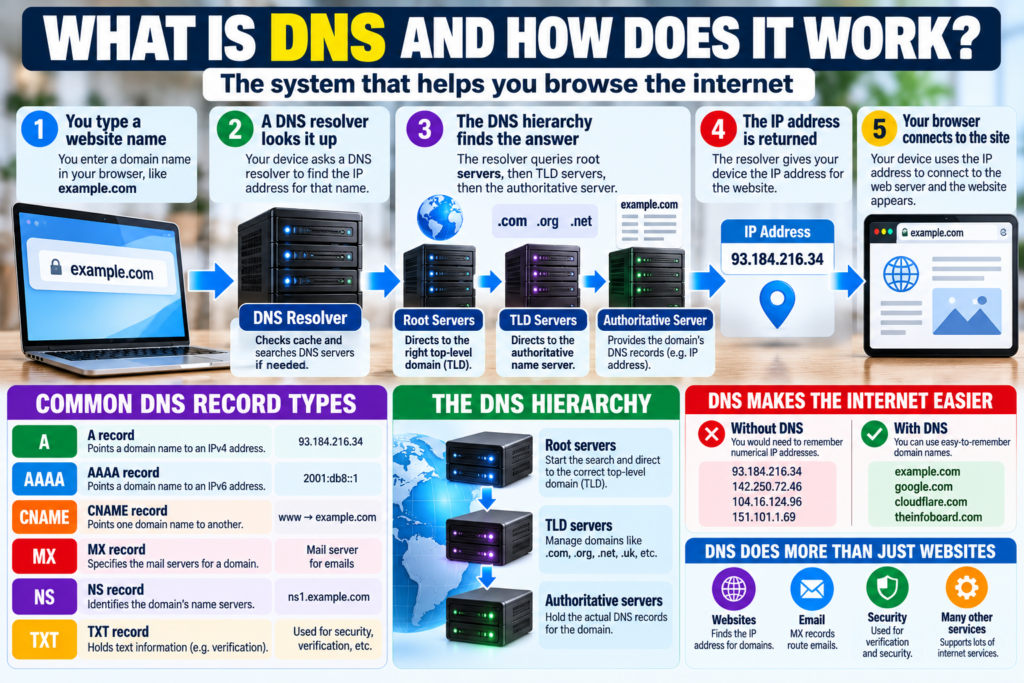
What Is DNS?
DNS stands for Domain Name System.
Its job is to associate domain names with information needed to reach internet services.
A simplified example looks like this:
You enter a domain name
↓
DNS looks up the appropriate address
↓
Your device learns where to connect
↓
The website can be requested
DNS is often compared to a phone book because it helps match a name with an address.
That’s a useful starting analogy, although the real system is considerably more sophisticated.
Why Do We Need DNS?
Humans are generally better at remembering names than long strings of numbers.
Imagine having to remember a numerical network address every time you wanted to visit:
- a search engine,
- your bank,
- a news website,
- an online shop,
- or your email provider.
It would be impractical.
Domain names give people memorable identifiers.
DNS provides the infrastructure that helps translate those identifiers into technical information computers can use.
What Is a Domain Name?
A domain name is a human-readable name used to identify resources on the internet.
For example:
example.com
A domain name can contain several parts.
In:
www.example.com
.com is the top-level domain.
example is the registered domain label.
www is a subdomain or hostname label used within that domain.
DNS is hierarchical, meaning different parts of the naming system can be managed at different levels.
What Is an IP Address?
An IP address identifies a network interface using the Internet Protocol.
Two major versions are widely relevant today:
IPv4
and
IPv6.
An IPv4 address might look something like:
192.0.2.1
An IPv6 address is longer and uses hexadecimal notation.
DNS means ordinary users usually don’t need to memorise these addresses.
You remember the domain.
The network handles the addressing.
What Happens When You Type a Website Into Your Browser?
Let’s follow a simplified DNS lookup.
Suppose you enter:
www.example.com
into your browser.
Step 1 — Your Device Checks What It Already Knows
Before asking other systems, your browser or operating system may check whether it recently looked up the same domain.
If the answer is still cached, another complete DNS lookup may not be necessary.
This can save time.
Step 2 — A DNS Resolver Is Asked
If the answer isn’t already available locally, your device usually sends a DNS query to a recursive resolver.
This resolver might be operated by:
- your internet service provider,
- your organisation,
- a public DNS provider,
- or another configured service.
The resolver’s job is to find the answer.
Step 3 — The Resolver Searches the DNS Hierarchy
If the resolver doesn’t already have the answer cached, it can consult DNS infrastructure to determine which servers know about the requested domain.
This may involve:
root servers
↓
top-level domain servers
↓
authoritative name servers.
Step 4 — The Appropriate DNS Record Is Returned
Eventually, the resolver obtains the relevant DNS information.
For a typical website lookup, this might include an IP address.
Step 5 — Your Device Connects to the Destination
Once your browser knows where to connect, it can begin communicating with the appropriate server.
DNS helped locate the destination.
It didn’t necessarily deliver the webpage itself.
That’s an important distinction.
What Is a DNS Resolver?
A DNS resolver acts on behalf of a client to obtain DNS information.
Think of it as the researcher in the process.
Your computer effectively asks:
“Where can I find this domain?”
The resolver tries to provide the answer.
If it already has a valid cached result, it may answer immediately.
Otherwise, it may need to query other DNS servers.
What Is a Root DNS Server?
The DNS hierarchy begins with the root.
Root servers don’t contain a complete list of every individual website and its IP address.
Instead, they help direct resolvers toward the servers responsible for top-level domains.
For example, a resolver looking for information about a .com domain can be directed toward the appropriate .com name servers.
The process then continues down the hierarchy.
What Is a Top-Level Domain?
The final portion of many domain names is called the top-level domain, or TLD.
Examples include:
.com
.org
.net
and country-code domains such as:
.uk
.de
.fr
and many others.
TLD name servers help direct DNS queries toward the authoritative servers responsible for individual domains.
What Is an Authoritative DNS Server?
An authoritative name server contains DNS information for a domain for which it is authoritative.
This is where the resolver can obtain the domain’s actual DNS records.
In simplified terms:
Root: “Ask the appropriate TLD.”
TLD: “Ask this domain’s authoritative server.”
Authoritative server: “Here’s the DNS information you’re looking for.”
The resolver then returns the answer to your device.
What Is a DNS Record?
DNS doesn’t store only one type of information.
It uses different types of records for different purposes.
Some of the most common include:
- A records,
- AAAA records,
- CNAME records,
- MX records,
- NS records,
- and TXT records.
Let’s look at what these mean.
What Is an A Record?
An A record associates a hostname with an IPv4 address.
In simplified form:
example.com → IPv4 address
This is one of the fundamental DNS record types used to help browsers and other applications locate services.
What Is an AAAA Record?
An AAAA record performs a similar role for IPv6.
Why four As?
Historically, an IPv6 address is four times the size of an IPv4 address in terms of bit length:
IPv4 uses 32 bits.
IPv6 uses 128 bits.
Hence the record name AAAA.
What Is a CNAME Record?
A CNAME, or canonical name record, allows one DNS name to act as an alias for another DNS name.
Instead of pointing directly to an IP address, it points toward another hostname.
This can be useful when multiple hostnames need to refer to the same underlying service.
What Is an MX Record?
An MX record is associated with email.
MX stands for Mail Exchange.
It tells mail systems which servers are responsible for receiving email for a domain.
So when someone sends an email to an address at a particular domain, DNS helps determine where that mail should be delivered.
DNS isn’t just about websites.
It’s critical to email too.
What Is an NS Record?
An NS record identifies the name servers responsible for a DNS zone.
NS stands for Name Server.
These records help establish which DNS servers are authoritative for particular domain information.
What Is a TXT Record?
TXT records allow domain administrators to publish text-based information in DNS.
Today they’re commonly used for purposes such as:
- domain verification,
- email authentication,
- security policies,
- and service configuration.
If you’ve ever verified ownership of a website with an online service, you may have been asked to add a TXT record.
What Is DNS Caching?
Imagine having to perform the complete DNS lookup process every single time anyone requested a popular website.
That would be inefficient.
DNS therefore relies heavily on caching.
When a resolver obtains a DNS answer, it can temporarily store it.
If another user requests the same information soon afterward, the resolver may be able to answer from its cache rather than repeating the entire lookup.
This reduces:
- lookup time,
- network traffic,
- and load on DNS infrastructure.
What Is TTL?
DNS records commonly have a value called TTL, meaning Time to Live.
TTL helps determine how long a DNS answer may be cached before it should be refreshed.
For example, a record might effectively say:
“You can reuse this answer for a certain period before asking again.”
Once the cached information expires, the resolver may need to retrieve a fresh answer.
This is important when website owners change DNS settings.
Read:What Happens When You Delete a File? Is It Really Gone?
Why Do DNS Changes Take Time?
You’ve probably heard the phrase:
“Wait for DNS propagation.”
Suppose a website owner changes the server associated with a domain.
The authoritative DNS data may be updated quickly.
But resolvers around the world may still have the old information cached.
Those caches don’t all expire at exactly the same moment.
As cached records are refreshed, more users begin receiving the new information.
This is why a DNS change can appear to work for one person while another person still reaches the old destination.
Is “DNS Propagation” Really DNS Spreading Around the World?
Not quite.
The phrase can make it sound as though one new record is physically travelling from server to server across the planet.
Often, what users are actually waiting for is cached old information to expire and be replaced with fresh answers.
The distinction is useful when troubleshooting website changes.
What Happens If DNS Stops Working?
Your internet connection may technically still be active while websites appear inaccessible by name.
For example, your router might be connected to your internet provider, but DNS queries could be failing.
You type a domain into your browser and receive an error because the computer can’t determine where the domain should lead.
This can make a DNS failure look like a complete internet outage.
But they’re not necessarily the same thing.
How Can You Tell Whether DNS Is the Problem?
DNS problems can produce symptoms such as:
- websites failing to resolve,
- “server IP address could not be found” messages,
- some services working while domain-based browsing fails,
- intermittent name-resolution problems,
- or one device behaving differently from another.
However, those symptoms can also have other causes.
DNS is only one part of the network path.
Does Restarting the Router Fix DNS Problems?
Sometimes — but not always.
Restarting a router can clear temporary problems and cause the device to reconnect to network services.
But if the actual issue is:
- an incorrect DNS configuration,
- a DNS-provider outage,
- a domain configuration error,
- or an authoritative DNS problem,
restarting your router may not solve it.
Troubleshooting should match the cause.
What Is a Public DNS Service?
You don’t necessarily have to use the DNS resolver automatically supplied by your internet service provider.
Public DNS services are also available.
A user may configure DNS manually on:
- a computer,
- phone,
- router,
- or other network device.
Different DNS providers may offer features related to:
- performance,
- privacy,
- filtering,
- security,
- parental controls,
- or malware-domain blocking.
However, changing DNS isn’t a magical solution to every internet problem.
Can Changing DNS Make the Internet Faster?
Possibly — but understand what “faster” means.
A quicker DNS resolver may reduce the time required to resolve a domain name, particularly when the answer isn’t already cached.
But DNS isn’t responsible for the entire download.
Once the browser knows where the website is located, many other factors affect performance:
- your broadband connection,
- Wi-Fi quality,
- distance to servers,
- server performance,
- network congestion,
- website design,
- and content size.
Changing DNS won’t turn a slow 20 Mbps internet connection into a 500 Mbps connection.
It can potentially improve name-resolution performance, not magically increase your broadband capacity.
Does DNS Hide Your Browsing?
Ordinary DNS wasn’t originally designed as a privacy system.
Traditional DNS queries can reveal which domain names a device is attempting to resolve to parties capable of observing those queries.
Modern technologies have been developed to improve DNS privacy.
Two terms you may encounter are:
DNS over HTTPS (DoH)
and
DNS over TLS (DoT).
What Is DNS Over HTTPS?
DNS over HTTPS, commonly called DoH, sends DNS queries through an encrypted HTTPS connection.
This can prevent parties on the local network path from simply reading traditional unencrypted DNS queries.
However, encrypted DNS doesn’t make your entire internet activity anonymous.
The DNS resolver itself may still process the query, and other parts of internet communication can reveal information.
Privacy is more complicated than merely turning on DoH.
What Is DNS Over TLS?
DNS over TLS, or DoT, also encrypts DNS traffic, but it uses TLS in a DNS-specific arrangement rather than sending queries through HTTPS in the same way as DoH.
Both technologies aim to protect DNS queries while they’re travelling between the client and resolver.
Which one is used depends on the operating system, browser, network and DNS provider.
Is DNS the Same as a VPN?
No.
These technologies perform very different jobs.
DNS helps resolve names into information required to locate internet services.
A VPN creates an encrypted tunnel between your device and a VPN endpoint and can change how your traffic is routed.
Changing your DNS provider doesn’t give you the same privacy or networking behaviour as using a VPN.
Likewise, using a VPN doesn’t eliminate the need for DNS.
Is DNS the Same as a Search Engine?
No.
This is another common misunderstanding.
Suppose you type:
theinfoboard.com
into your browser.
DNS helps the browser locate that domain.
But if you search:
“why do onions make you cry”
a search engine processes your query and tries to identify relevant webpages.
DNS doesn’t decide which websites are most relevant.
It isn’t ranking search results.
It is part of the internet’s naming infrastructure.
DNS vs URL: What’s the Difference?
A domain name is only one component that may appear inside a URL.
For example, a URL might include:
- a protocol,
- domain,
- path,
- query parameters,
- and other information.
DNS primarily deals with resolving the hostname portion.
It doesn’t normally decide which specific article or page within the website you’re requesting.
After the connection is established, web protocols handle that part.
Can One Domain Point to Multiple IP Addresses?
Yes.
Large online services may use multiple servers and IP addresses.
DNS can participate in distributing traffic across infrastructure.
A domain may return different addresses depending on factors such as:
- location,
- availability,
- network architecture,
- traffic-management systems,
- or other configuration.
This is one reason the internet can continue serving enormous numbers of users without every request going to one physical computer.
Can Multiple Websites Use the Same IP Address?
Yes.
A single server or hosting platform can serve many different websites.
Modern web servers can determine which website a visitor requested and deliver the appropriate content.
So the relationship isn’t always:
one domain = one dedicated IP address.
The real internet is considerably more flexible.
How Does DNS Help Email Work?
Suppose someone sends a message to:
person@example.com
The sending mail server needs to determine where email for example.com should go.
DNS MX records provide this information.
Without correctly configured DNS, a website might work while email for the same domain fails — or vice versa.
That’s because different DNS records control different services.
Why Website Owners Need to Be Careful With DNS
Changing DNS settings incorrectly can cause serious problems.
A mistake might make:
- the website inaccessible,
- email stop arriving,
- subdomains fail,
- verification systems break,
- or third-party services stop working.
That’s why website owners should record existing DNS settings before making major changes.
DNS entries may look like small lines of technical text, but they can control critical infrastructure.
What Is DNSSEC?
DNS was created in an era when the internet was much smaller and security requirements were different.
One technology designed to strengthen DNS is DNSSEC, short for Domain Name System Security Extensions.
DNSSEC uses cryptographic signatures to help DNS resolvers verify that certain DNS information is authentic and hasn’t been altered in transit.
It’s designed to protect the integrity and authenticity of DNS data.
Does DNSSEC Encrypt DNS Queries?
No.
This is an important distinction.
DNSSEC provides authentication and integrity mechanisms for DNS data.
It doesn’t primarily exist to hide the contents of DNS queries.
Technologies such as DoH and DoT address encryption of DNS traffic between clients and resolvers.
Different technologies solve different problems.
What Is DNS Spoofing?
DNS spoofing involves causing a system to receive false DNS information.
Imagine typing the correct bank domain but being maliciously directed toward the wrong server.
That illustrates why DNS integrity matters.
Modern security involves multiple layers, including:
- DNS protections,
- HTTPS certificates,
- browser security,
- and user awareness.
DNSSEC can help protect against certain forms of DNS-data manipulation, but no single technology solves every security threat.
Why HTTPS Still Matters
Even if DNS directs you to the correct IP address, your browser still needs a secure way to communicate with the website.
That’s where HTTPS and TLS become important.
HTTPS helps provide:
- encryption,
- data integrity,
- and server authentication.
DNS and HTTPS therefore perform different jobs.
A simplified view is:
DNS helps find the destination.
HTTPS helps secure web communication with the destination.
Why DNS Is Mostly Invisible
Good infrastructure tends to disappear into the background.
Most people don’t think about DNS because it usually works automatically.
You:
type a name → press Enter → website appears.
Behind those few seconds may be:
- caches,
- recursive resolvers,
- authoritative servers,
- multiple DNS records,
- routing systems,
- web servers,
- encryption,
- and many other technologies.
DNS is only one piece of that system, but it’s an essential one.
A Simple Way to Remember DNS
Think of internet browsing as visiting a building.
You know the business name.
But to travel there, you need an address.
DNS helps answer:
“What network address is associated with this name?”
Once you have the address, the journey can begin.
It’s not a perfect analogy, but it captures the central idea.
Read:What Is a VPN and What Does It Actually Do?
The Bottom Line
DNS — the Domain Name System — is one of the technologies that makes the internet practical for humans.
Instead of memorising numerical IP addresses, we can use readable domain names.
When your device needs to reach a domain, DNS helps determine the information required to locate the appropriate internet service.
The system relies on a hierarchy that can involve:
recursive resolvers → root servers → top-level domain servers → authoritative name servers.
Caching makes the process faster, while DNS record types allow the system to support websites, email and many other services.
DNS usually operates quietly in the background.
But without it, using the internet would be dramatically less convenient.
Every time you type a familiar website name instead of a long numerical address, you’re benefiting from one of the internet’s most important pieces of infrastructure.
Frequently Asked Questions
What does DNS stand for?
DNS stands for Domain Name System.
What does DNS actually do?
DNS associates domain names with technical information used to locate internet services, including IP addresses.
What is a DNS server?
“DNS server” is a broad term. DNS infrastructure includes recursive resolvers, authoritative name servers, root servers and other systems that perform different roles.
Can changing DNS make Wi-Fi faster?
Changing DNS may improve domain lookup performance in some circumstances, but it doesn’t increase the underlying speed or capacity of your Wi-Fi or broadband connection.
What happens if DNS isn’t working?
Your internet connection may remain active, but your device can have difficulty locating websites and other services by domain name.
Is DNS the same as an IP address?
No. A domain name is a human-readable identifier, while an IP address is used by Internet Protocol networking. DNS helps associate the two.
Is DNS the same as a VPN?
No. DNS performs name resolution. A VPN creates a network tunnel and changes how traffic is routed. They serve different purposes.
What is DNS caching?
DNS caching temporarily stores previous lookup results so the same information doesn’t need to be retrieved from authoritative DNS infrastructure every time.
Leave a Comment