VPN adverts often promise privacy, security and anonymity in a single click. A virtual private network (VPN) can be useful, but those promises need explaining. It protects certain network connections and changes the IP address that websites normally see; it does not automatically stop scams, viruses or tracking through your online accounts.
This guide explains how a VPN works, what it protects, its limitations and how to decide whether you need one.
What is a VPN?
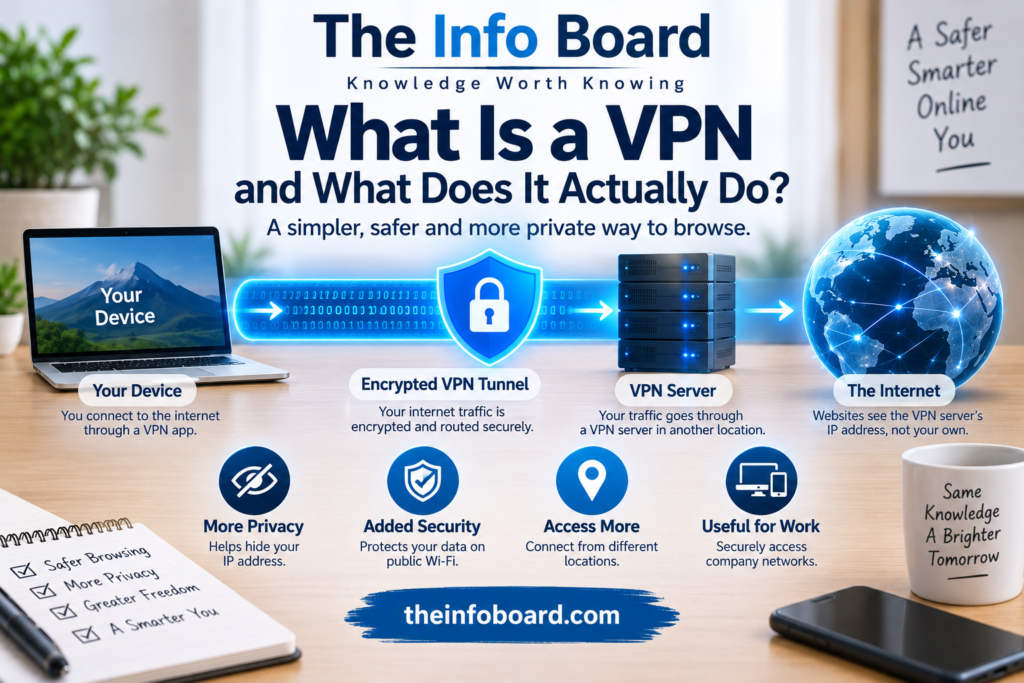
A VPN is a technology that establishes a protected connection over another network. With a typical consumer VPN, an app on your phone or computer creates an encrypted tunnel to a VPN server. Internet traffic configured to use that tunnel then travels via the VPN server before reaching its destination.
Businesses also use VPNs to give authorised employees secure access to internal systems from elsewhere. The UK’s National Cyber Security Centre (NCSC) explains how organisational VPNs provide encrypted remote connectivity.
How does a VPN work? A simple example
Imagine opening a news website on your laptop.
- Without a VPN: your device sends requests through your home router and internet provider toward the website. The website usually sees the public IP address associated with your connection.
- With a consumer VPN: your device first establishes an encrypted connection to the VPN provider’s server.
- The VPN server forwards the traffic: the website usually sees the VPN server’s public IP address rather than your normal public IP address.
- The response returns: the VPN server sends traffic back through the encrypted tunnel to your device.
The protection applies to traffic actually routed through the VPN. Some apps allow split tunnelling, where selected traffic bypasses it.
What can a VPN protect — and what can’t it?
| Question | Practical answer |
|---|---|
| Can it hide my usual public IP address from a website? | Usually yes, for connections routed through the VPN. |
| Can it make local Wi-Fi monitoring harder? | Yes, an appropriately configured encrypted tunnel reduces visibility into traffic inside it. |
| Does it make me anonymous? | No. Accounts, cookies and other identifiers can still identify you. |
| Does it protect me from phishing? | No. You can still enter details into a fraudulent website. |
| Does it stop viruses and malware? | Not by itself. Malware prevention is a separate security function. |
| Does it replace HTTPS? | No. HTTPS remains important for protecting communication with websites. |
| Does it automatically improve broadband speed? | No. Extra routing can make some connections slower. |
Does a VPN hide your IP address and location?
For websites reached through a consumer VPN, the apparent source IP address is generally the VPN server’s. This can make your connection appear to come from a different city or country.
However, an IP address is not the only source of location information. Apps may have location permissions, and services can also use account details, saved preferences or device information. A VPN does not necessarily override any of those.
For more background, read our guide to what an IP address can reveal about you.
Does a VPN make you anonymous online?
No. If you connect to a VPN and then sign into a social media or shopping account, the service still knows which account is being used. Browser cookies and other tracking methods can also continue to operate.
A VPN changes one important part of your internet connection; it does not erase your identity or browsing history held by websites. Claims of complete anonymity should be treated sceptically.
Who can see your activity when you use a VPN?
Your internet provider or public Wi-Fi operator
They can generally see a connection to the VPN server and some associated connection information, such as timing and data volume. They usually cannot simply read the contents of traffic protected within a properly configured encrypted VPN tunnel.
Your VPN provider
The provider operates the server through which your traffic passes. Depending on its technology and policies, it may be able to observe connection metadata and some information about destinations. This means you are shifting some trust from your internet provider to the VPN company, rather than removing the need to trust anyone.
The website you visit
The website can still see your requests, the account you use, and information shared by your browser. When the site uses HTTPS, the content of the HTTPS connection remains encrypted in transit, including from the VPN provider under normal circumstances.
VPN vs HTTPS: what’s the difference?
These technologies protect different parts of a connection:
- VPN encryption protects traffic between your device and the VPN endpoint.
- HTTPS protects web communication between your browser and the website using TLS.
Most mainstream websites already use HTTPS, which is one reason browsing without a VPN is not automatically unsafe. The NCSC recommends using appropriate encrypted application protocols and VPNs where additional network-layer protection is needed.
Is a VPN useful on public Wi-Fi?
It can provide an additional layer of protection when using a café, hotel or airport network you do not control. It may also make some network-based monitoring or interference more difficult.
But a VPN cannot tell whether a Wi-Fi hotspot is legitimate, fix an infected device or protect you after you enter a password on a fake website. Continue to use HTTPS, install security updates and take browser warnings seriously.
If you want to understand how a wireless connection works, see our Wi-Fi explainer.
Can a VPN protect you from scams, hackers or malware?
A VPN is not an all-in-one security product. Some companies bundle malicious-site blocking or other features with a VPN subscription, but those protections are separate from the encrypted tunnel itself.
For example, a fake banking website can still trick a person into typing their password, even while the VPN is connected. Keep software updated, use unique passwords and enable multi-factor authentication on important accounts. See our guide to two-factor authentication.
Are free VPNs safe?
Not all free VPN services are alike. Some reputable companies offer limited free plans, while unfamiliar providers may have unclear ownership, intrusive permissions, questionable data collection or weak technical protections.
Before installing any VPN, ask:
- Who operates the service, and how does it make money?
- Does it clearly explain what it logs and how long records are retained?
- Does it publish understandable privacy and security policies?
- Does it use established, well-documented VPN protocols?
- Are there credible independent security assessments or a transparent record of fixing vulnerabilities?
- What happens if the connection drops?
A paid subscription is not a guarantee of privacy, just as a free plan is not proof of poor security.
What are VPN protocols, kill switches and split tunnelling?
| Term | What it means |
|---|---|
| VPN protocol | Technology used to establish and secure the tunnel; examples include WireGuard, OpenVPN and IKEv2/IPsec. |
| Kill switch | A feature intended to block or restrict traffic if the VPN connection unexpectedly drops. Its exact behaviour varies by app. |
| Split tunnelling | A setting that sends only some traffic through the VPN, leaving other traffic on the ordinary connection. |
| VPN server location | The location of the endpoint handling your routed traffic; distant endpoints can increase latency. |
Business VPNs can use different configurations from consumer VPN apps. The NCSC’s VPN deployment guidance explains why tunnel configuration and software maintenance matter.
Will a VPN make your internet faster?
Usually not. Encryption and sending traffic through another server introduce extra work and may increase latency. Performance depends on server load, distance, protocol and network routing. Occasionally a particular route performs better, but that is not something a VPN can guarantee.
For slow home broadband, it is generally more useful to investigate Wi-Fi signal strength, your router, connection speeds and congestion before paying for a VPN.
Do you actually need a VPN?
It depends on what you are trying to achieve:
- Remote work: if your employer requires a corporate VPN, use the approved service and follow its instructions.
- Untrusted networks: a reputable VPN can add protection when you connect through public networks.
- IP-address privacy: a consumer VPN can prevent destination websites from directly seeing your normal public IP address for routed traffic.
- Ordinary home browsing: a VPN may be optional if your primary needs are already met by secure Wi-Fi, HTTPS, updates and good account security.
Rather than asking whether everyone should buy a VPN, ask what specific problem it would solve for you.
Frequently asked questions
What does VPN stand for?
VPN stands for Virtual Private Network.
Does a VPN hide my browsing from my internet provider?
It reduces the provider’s visibility into traffic routed through the encrypted tunnel, but the provider can generally see that you are connecting to the VPN service.
Should I leave my VPN on all the time?
There is no single rule. Continuous use may suit some privacy or work requirements, but it can affect speed, battery use and compatibility with certain services.
Can websites block VPN connections?
Yes. Some websites flag or restrict traffic from known VPN servers, sometimes requiring extra verification.
Does a VPN replace antivirus software or two-factor authentication?
No. They protect against different kinds of risks and may be useful together.
The bottom line
A VPN can encrypt traffic between your device and a VPN endpoint, route selected connections through that server and usually conceal your normal public IP address from websites you visit through it. Those are meaningful benefits in the right circumstances.
But a VPN does not automatically make you anonymous, protect you from phishing or replace HTTPS and sensible security practices. Choose one only when you understand the benefit you need and trust the organisation providing it.
Technical guidance reviewed for clarity in October 2026. This is general information, not an endorsement of any VPN product or provider.