andYou board a flight, find your seat and hear a familiar announcement:
“Please switch your devices to airplane mode.”
You tap the small airplane icon on your phone, and within seconds your mobile connection disappears.
But your phone is still working.
You can take photos, read downloaded books, watch saved videos and, on many flights, turn Wi-Fi or Bluetooth back on.
So what exactly did airplane mode switch off?
Airplane mode is essentially a device setting that disables certain wireless radio connections, especially the cellular connection your phone normally uses to communicate with mobile networks.
It does not turn your smartphone into an ordinary offline brick. Modern devices allow much more flexibility than the name might suggest.
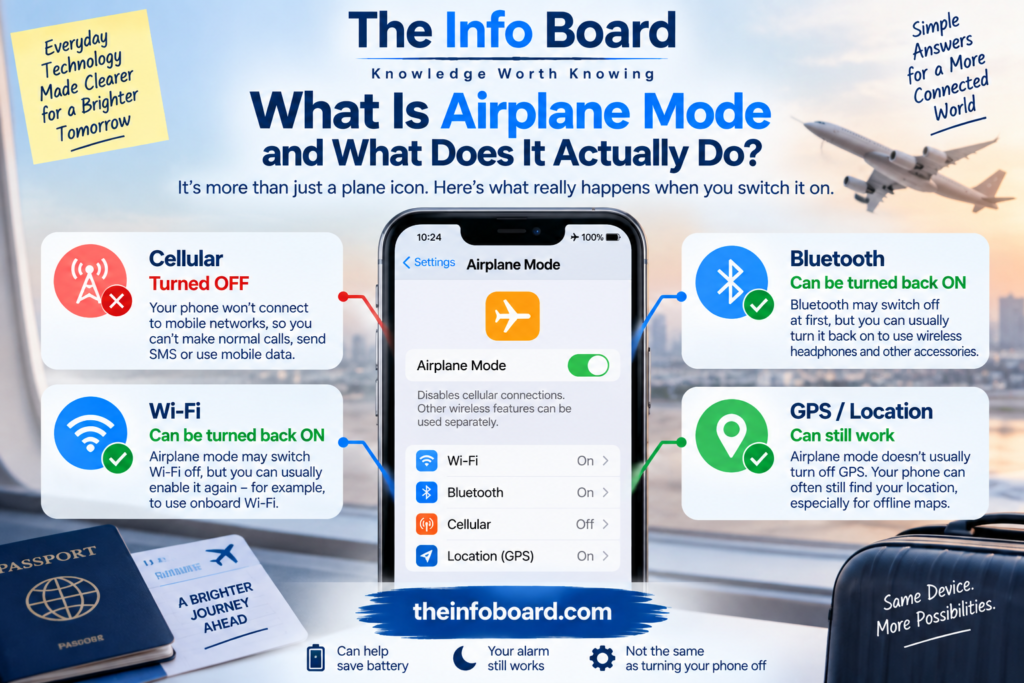
What Is Airplane Mode?
Airplane mode — sometimes called flight mode — is a setting found on smartphones, tablets, laptops and some other electronic devices.
When activated, it disables wireless communication functions according to the device’s design.
On a typical smartphone, the most important change is that the phone stops communicating with the cellular network.
That means it will no longer maintain its normal connection to nearby mobile-network base stations.
Depending on the device, Wi-Fi and Bluetooth may initially be switched off as well.
However, modern phones commonly allow you to enable Wi-Fi and Bluetooth again while leaving airplane mode active.
Why Does Your Phone Normally Communicate With Cell Towers?
A smartphone isn’t simply waiting quietly until somebody calls you.
When cellular service is enabled, it interacts with the mobile network so the network knows how to provide service to the device.
As you move around, your phone may connect through different cells in the network.
This is what allows you to make calls, send ordinary SMS messages and use mobile data across large areas without manually selecting a new tower every few kilometres.
Airplane mode interrupts that normal cellular radio connection.
What Happens When You Turn Airplane Mode On?
The exact behaviour depends on your device and operating system, but the main idea is straightforward.
Your phone stops using its cellular radio connection.
As a result, ordinary cellular functions become unavailable.
Typically, you won’t be able to use:
mobile data, normal cellular calls or traditional SMS through the mobile network.
Wi-Fi and Bluetooth behaviour can vary. On many current devices, they can be used separately while airplane mode remains enabled.
This is why you can sometimes connect to an aircraft’s Wi-Fi while the airplane symbol is still visible on your phone.
Does Airplane Mode Turn Off Wi-Fi?
It may turn Wi-Fi off when you first activate it, depending on the device and its previous settings.
But Wi-Fi can generally be turned back on independently on modern smartphones.
That distinction is important.
Airplane mode does not necessarily mean:
“Every radio inside this device must remain switched off.”
Instead, it provides a convenient way to disable certain wireless functions — particularly cellular connectivity — while allowing permitted services to be re-enabled.
This is how passengers can use onboard Wi-Fi where the airline provides and permits it.
Our Android Airplane Mode Test
We tested Airplane Mode on an Android phone to see what happened to its wireless connections.
When we enabled Airplane Mode, both Wi-Fi and Bluetooth switched off.
We then manually switched Wi-Fi back on while keeping Airplane Mode enabled. The phone allowed Wi-Fi to reconnect without turning Airplane Mode off.
What this shows: On the Android phone we tested, Airplane Mode initially disabled Wi-Fi and Bluetooth, but Wi-Fi could be re-enabled separately.
Behaviour may vary depending on the phone model, Android version and saved wireless settings.
Does Airplane Mode Turn Off Bluetooth?
Again, not necessarily permanently.
Bluetooth may initially be disabled when airplane mode is activated, but many modern devices allow it to be switched back on.
This is useful because passengers often use:
wireless headphones, earbuds, keyboards and other Bluetooth accessories.
Whether and when you may use a particular device on an aircraft depends on airline instructions and applicable aviation rules.
Read:What Is Bluetooth and How Does It Actually Work?
Can You Use the Internet in Airplane Mode?
Yes — if Wi-Fi is available and you enable it.
Airplane mode disables your normal mobile-data connection, but it does not prevent you from manually using an allowed Wi-Fi network.
For example, an aircraft may provide onboard Wi-Fi.
You could:
turn on airplane mode, enable Wi-Fi again, connect to the aircraft network and access whatever internet service is available.
Your phone would still not be using its ordinary terrestrial cellular connection.
Why Are Phones Put in Airplane Mode?
The purpose is to control radio transmissions from personal electronic devices during flight.
Aviation authorities and airlines establish rules for the use of electronic devices and wireless transmitters aboard aircraft.
Modern aircraft are designed and tested with electromagnetic environments in mind, but aviation procedures are deliberately conservative.
Rather than allowing every passenger’s phone to continuously attempt ordinary cellular operation throughout a flight, airplane mode provides a simple standard setting passengers can use.
You should therefore follow the instructions given by the airline and cabin crew on your specific flight.
What Happens If You Forget to Turn It On?
One phone left in normal cellular mode does not mean an aircraft will suddenly fall from the sky.
That dramatic idea misrepresents the issue.
A phone may continue trying to communicate with terrestrial cellular networks as the aircraft moves.
The relevant concern is unnecessary radio transmission and compliance with aviation and telecommunications requirements, not the idea that a single smartphone automatically disables aircraft systems.
The sensible rule is much simpler:
follow the crew’s instructions and use airplane mode when requested.
Why Can’t Phones Simply Connect to Cell Towers From the Air?
Cellular networks are primarily designed for devices operating on the ground.
A phone aboard a fast-moving aircraft at altitude is in a very different radio environment.
It may be within radio range of multiple ground-based cells while moving rapidly across their coverage areas.
Traditional terrestrial cellular systems weren’t primarily designed around large numbers of airborne phones behaving this way.
Some aircraft and networks use specialised systems for onboard connectivity instead.
Does Airplane Mode Disable GPS?
This is one of the most commonly misunderstood parts of airplane mode.
GPS reception and cellular transmission are different things.
GPS/GNSS positioning works primarily by receiving signals from navigation satellites.
Your phone does not need to transmit a signal to a GPS satellite to calculate its location.
Therefore, airplane mode does not necessarily prevent the phone’s satellite-positioning receiver from working.
However, map applications may behave differently when internet access is unavailable.
So Can Google Maps Work in Airplane Mode?
Potentially, yes — provided the necessary map information is already stored on the device and satellite reception is available.
There are two separate things involved:
finding your position and downloading the map.
Your phone may be able to determine its position using satellite-navigation signals while having no internet connection.
But if the map tiles, route information or other data have not been downloaded, the app may have little information to display.
This is why offline maps can be useful when travelling.
Does Airplane Mode Stop Location Tracking?
Not automatically.
This is an important privacy distinction.
Airplane mode is not a universal “stop all location tracking” button.
Your device may still determine location using GPS/GNSS and potentially other locally available information.
Applications may also store location-related information and synchronise it later when connectivity returns, depending on permissions and software behaviour.
If your goal is privacy rather than flight compliance, you need to examine the device’s location permissions and privacy settings, not rely solely on airplane mode.
Can You Receive Calls in Airplane Mode?
Not through your ordinary cellular connection while the cellular radio is disabled.
Someone calling your mobile number normally will not reach your handset through the standard mobile network at that moment.
What happens to the call depends on your carrier and account configuration. It may, for example, be routed to voicemail.
However, there is an important complication.
If you reconnect to Wi-Fi, certain internet-based communication services can work.
Depending on your carrier, device and settings, Wi-Fi Calling may also be available.
So “airplane mode means absolutely no calls of any kind” isn’t always accurate.
Can WhatsApp or Other Messaging Apps Work?
Yes, if your phone has an internet connection through Wi-Fi.
Apps such as internet messaging services don’t inherently require the cellular voice network.
They require data connectivity.
So you could have:
Airplane mode: ON
Cellular connection: OFF
Wi-Fi: ON
and still use supported internet-based messaging services.
If there is no Wi-Fi or other permitted data connection, new messages generally cannot be sent or received until connectivity returns.
Can You Send SMS Messages?
Traditional SMS normally relies on your mobile network connection, so it generally will not work through the normal cellular route while that connection is disabled.
However, modern phones can blur the distinction between traditional SMS and internet-based messaging.
Some messaging systems can send messages using Wi-Fi or mobile data.
Therefore, whether a particular message can be sent depends on which messaging technology is actually being used.
Read:What Is a VPN and What Does It Actually Do?
Does Airplane Mode Save Battery?
It can.
Maintaining wireless connections requires energy.
Cellular communication can consume additional power when reception is poor because the device may need to work harder to maintain or search for service.
Airplane mode removes that cellular activity.
This can be particularly useful in an area with little or no mobile signal.
Instead of repeatedly searching for a network, the cellular radio remains disabled.
However, battery savings depend on what else you’re doing.
Playing a demanding game at maximum brightness will still consume plenty of power even in airplane mode.
Why Does Poor Signal Drain the Battery Faster?
Your phone continuously manages its connection with the cellular network.
When signal conditions are difficult, maintaining that connection can require more radio activity and transmission power.
If no usable network is available, the phone may periodically search for service.
That activity consumes energy.
This explains why a phone can sometimes lose battery surprisingly quickly in remote areas, underground locations or buildings with poor reception.
Temporarily using airplane mode can prevent unnecessary cellular searching when you already know there is no usable service.
Can Airplane Mode Make Your Phone Charge Faster?
Sometimes, but the effect shouldn’t be exaggerated.
If airplane mode reduces background wireless activity, the phone may consume less energy while charging.
That can leave slightly more of the charger’s output available to increase the battery’s stored energy.
But charging speed depends much more heavily on factors such as:
charger power, charging protocol, battery temperature, battery state of charge and the phone’s charging management.
Airplane mode is not a substitute for an appropriate charger.
Does Airplane Mode Stop Notifications?
Only notifications that depend on connections you have disabled.
If airplane mode leaves you completely offline, apps cannot receive new information from internet servers.
So many new email, social-media and messaging notifications will stop arriving.
But local notifications can still appear.
For example, an alarm, calendar reminder or notification generated entirely by an app on the phone may still work.
And if you turn Wi-Fi back on, internet notifications can begin arriving again.
Will Your Alarm Still Work?
Yes, on normal smartphones the built-in alarm function does not require a cellular network.
Airplane mode doesn’t turn the phone off.
The operating system continues running.
Therefore, an alarm you’ve set should still sound normally, assuming the phone itself remains powered on and the alarm settings are correct.
This is one reason some people use airplane mode overnight.
Is Airplane Mode the Same as Turning Your Phone Off?
No.
Turning the phone off shuts down the operating system and most normal device functions.
Airplane mode leaves the device running while changing its wireless connectivity.
You can still:
take photos, use the calculator, write notes, play downloaded media, read stored documents, use many offline apps and perform numerous other tasks.
Think of airplane mode as changing the phone’s radios, not shutting down the phone itself.
Is Airplane Mode the Same as Do Not Disturb?
No. They solve completely different problems.
Airplane mode controls wireless connectivity.
Do Not Disturb controls interruptions such as sounds, calls and notifications according to your settings.
A phone in Do Not Disturb can remain fully connected to mobile networks and the internet.
A phone in airplane mode may be disconnected while still making sounds from alarms or local notifications.
You can also use both settings simultaneously.
Is Airplane Mode the Same as Turning Off Mobile Data?
No.
Turning off mobile data prevents apps from using the cellular network for internet data, but the phone may remain connected to the cellular network for calls and SMS.
Airplane mode goes further by disabling the normal cellular radio connection itself.
This distinction is useful when travelling.
If you simply want to prevent mobile-data use while keeping normal calls available, turning off mobile data may be more appropriate than airplane mode.
Does Airplane Mode Prevent Roaming Charges?
While your cellular connection is disabled, your phone cannot normally use foreign cellular networks for ordinary roaming activity.
However, airplane mode should not be treated as your only understanding of roaming controls.
If you’re travelling internationally, review:
data roaming settings, your carrier’s roaming policy, call charges and your tariff.
Once airplane mode is switched off, the phone may reconnect to an available network.
Understanding your carrier’s terms is therefore more important than relying on the airplane icon alone.
Can You Use Airplane Mode on the Ground?
Absolutely.
Despite the name, airplane mode isn’t restricted to aircraft.
People use it for many reasons.
You might enable it when:
you have no signal and want to conserve battery, you want a temporary break from cellular connectivity, you’re troubleshooting a connection, or you’re travelling and want tighter control over roaming.
It is simply a connectivity setting.
The airplane is the historical context, not a technical requirement.
Why Does Toggling Airplane Mode Sometimes Fix Mobile Signal?
You’ve probably seen this troubleshooting advice:
Turn airplane mode on, wait a few seconds, then turn it off.
Why can that help?
Because disabling and re-enabling the cellular radio forces the device to establish its network connection again.
If the phone has become stuck with a poor or stale network state, reconnecting can sometimes resolve the problem.
It isn’t guaranteed to fix every connectivity issue, but it is a quick way to reset the phone’s wireless network interaction without restarting the entire device.
Does Airplane Mode Make You Invisible Online?
No.
This is another important misconception.
If airplane mode disconnects you from every network, then naturally you aren’t actively communicating with internet services during that period.
But airplane mode does not erase:
browser history, account activity, previously collected data, stored cookies, downloaded information or information already held by online services.
And the moment you reconnect through Wi-Fi, normal online activity can resume.
Airplane mode is a radio-control feature, not an anonymity system.
Can Bluetooth Headphones Work in Airplane Mode?
Usually, yes.
On many modern phones, you can activate airplane mode and then enable Bluetooth again.
That allows you to use wireless headphones while keeping the cellular connection disabled.
Airline policies still apply, so follow crew instructions about when electronic devices and wireless accessories may be used.
Why Can Airlines Offer Wi-Fi but Ask for Airplane Mode?
Because these are different radio systems operating under different arrangements.
Airplane mode disables your phone’s normal cellular connection.
The aircraft’s Wi-Fi system is specifically installed and operated to provide onboard connectivity.
Depending on the aircraft, the onboard internet system may connect beyond the aircraft using satellite links or air-to-ground infrastructure.
Your phone communicates locally with the aircraft’s Wi-Fi access point rather than simply behaving as though it were standing beside an ordinary home router connected to a ground broadband line.
Does Airplane Mode Work the Same on Every Phone?
No.
The broad purpose is similar, but exact behaviour can vary by:
manufacturer, operating system, software version and remembered connectivity settings.
For example, a phone may remember that you previously turned Bluetooth back on while airplane mode was active.
The next time you enable airplane mode, Bluetooth may behave differently based on that stored preference.
If you need to know exactly which radios are active, check the device’s control panel or settings rather than relying only on the airplane icon.
What Should You Check Before a Flight?
A few minutes of preparation can make your phone much more useful without an internet connection.
Before leaving, consider downloading:
your boarding pass, offline maps, music, podcasts, films, books and important travel information.
Make sure anything requiring an app login is accessible offline if necessary.
Charge the device.
Then, once aboard, follow the airline’s instructions regarding airplane mode, Wi-Fi, Bluetooth and electronic-device use.
The Bottom Line
Airplane mode is a setting that disables your phone’s normal cellular radio connection and controls other wireless connections according to the device’s configuration.
It does not turn your phone off.
necessarily disable GPS.
It does not guarantee that Wi-Fi and Bluetooth remain off.
And it does not make your phone anonymous or automatically prevent every form of location processing.
Modern smartphones can often use Wi-Fi and Bluetooth while airplane mode remains active, which is why you can connect to onboard internet and wireless headphones without restoring the ordinary cellular connection.
So when you tap that little airplane icon, you’re not shutting down your smartphone.
Read:Why Are Software Updates So Important?
You’re changing how it communicates with the outside world.
Frequently Asked Questions
What does airplane mode actually turn off?
On a smartphone, its most important effect is disabling the normal cellular connection. Wi-Fi and Bluetooth may initially be disabled too, but modern devices commonly allow them to be switched back on separately.
Can I use Wi-Fi in airplane mode?
Yes. On modern devices, Wi-Fi can generally be enabled while airplane mode remains active.
Can I use Bluetooth headphones in airplane mode?
Usually yes. Bluetooth can commonly be turned back on after activating airplane mode, subject to airline instructions.
Does airplane mode turn off GPS?
Not necessarily. Satellite positioning primarily involves receiving signals, so GPS/GNSS functionality may continue to operate. Apps may still need downloaded map data to be useful offline.
Will my alarm work in airplane mode?
Yes. A normal phone alarm doesn’t require a mobile or internet connection.
Does airplane mode save battery?
It can, particularly when the phone would otherwise spend energy maintaining or searching for a weak cellular connection.
Can I receive WhatsApp messages in airplane mode?
If Wi-Fi is enabled and connected to the internet, internet-based messaging services can continue to work.
Does airplane mode stop all tracking?
No. Airplane mode is not a privacy or anonymity feature. Location services and other device functions are controlled separately.