A text message arrives on your phone.
It says a new Direct Debit has been set up, your parcel couldn’t be delivered, you have an unpaid parking charge, or suspicious activity has been detected on your bank account.
There’s usually something else too: urgency.
“Pay within 24 hours.”
“Your account will be suspended.”
“Click here to prevent the transaction.”
The message may look professional. It might use the name of a company you recognise, contain convincing spelling and grammar, and refer to something that could genuinely apply to you.
That’s what makes modern scam texts dangerous.
Scam text messages, sometimes called smishing, are designed to persuade you to act before you’ve had enough time to question what’s happening.
The objective may be to steal your card details, banking credentials, passwords or personal information. Some messages try to make you call a fraudulent number, while others send you to a fake website or attempt to persuade you to install software.
The good news is that you don’t need to become a cybersecurity expert to protect yourself.
A few simple habits can make scam texts much easier to recognise and much harder to fall for.
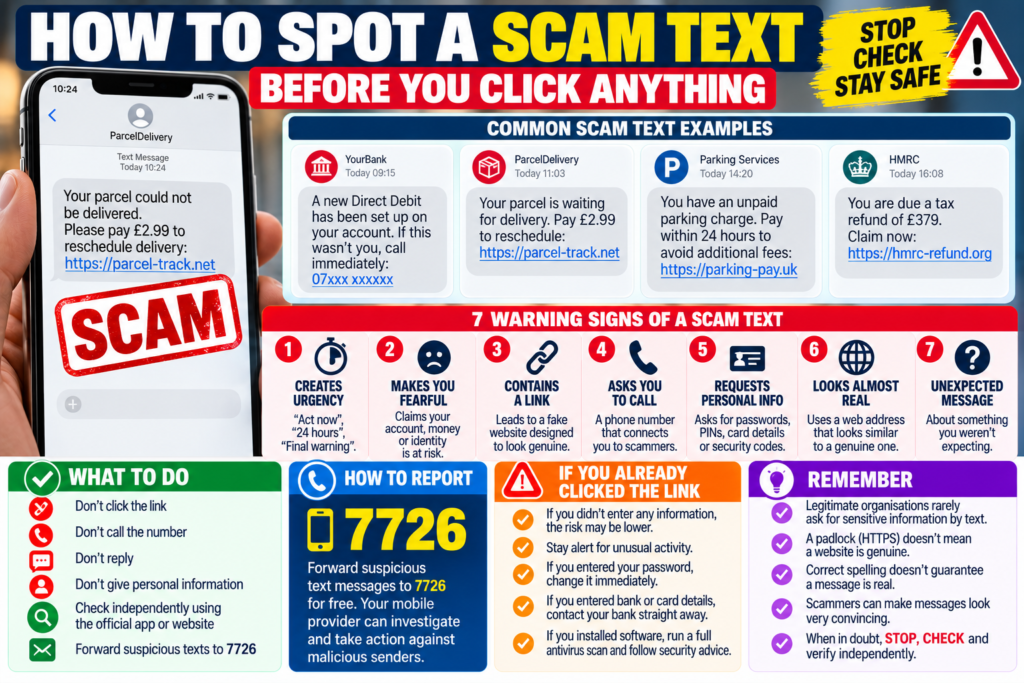
There is no single template for a scam message.
Fraudsters frequently impersonate organisations people already know and trust, including banks, delivery companies, government departments, parking services, mobile networks, online retailers and utility companies.
They may also pretend to be someone you know personally.
One common example is a message claiming to come from a family member who has lost or broken their phone and is contacting you from a new number.
Eventually, the supposed family member may ask for money.
Other scams begin with an apparent bank warning:
“A new Direct Debit has been created on your account. If this wasn’t you, call immediately.”
Another might claim:
“We were unable to deliver your parcel. Pay £1.49 to arrange redelivery.”
Or:
“You have an unpaid parking charge. Pay today to avoid additional fees.”
The details change, but the strategy is usually similar.
The scammer creates a believable situation, gives you a reason to worry and then provides the action they want you to take.
That action could be clicking a link, calling a number, entering information or sending money.
The most important thing to recognise is that a scam text doesn’t have to look amateurish.
Poor spelling can still be a warning sign, but good spelling doesn’t prove that a message is genuine. The UK’s National Cyber Security Centre warns that scam communications have become increasingly sophisticated and can sometimes fool experienced users. National Cyber Security Centre
Modern criminals can copy genuine company communications, use professional templates and produce convincing text very easily.
Judge the request, not simply how polished the message looks.
7 Warning Signs of a Scam Text
Rather than looking for one perfect giveaway, look for a combination of warning signs.
1. The message tries to rush you
Urgency is one of the most common techniques used in scams.
You may be told that you have only a few hours to pay, that your account is about to be suspended or that a suspicious transaction must be stopped immediately.
A genuine organisation can occasionally have a legitimate deadline.
But urgency should make you more cautious, not less.
Scammers benefit when you act before thinking.
2. The message tries to frighten you
Fear works for the same reason.
A message might claim that hundreds of pounds have left your bank account, that you’ve received a fine or that somebody has accessed your account.
When money or personal information appears to be in immediate danger, people naturally want to fix the problem quickly.
That’s exactly when you should slow down.
Don’t use the suspicious message itself to solve the supposed emergency.
3. There’s an unexpected link
A fraudulent link may lead to a website designed to imitate your bank, a delivery company, a government service or another legitimate organisation.
The fake page may contain the correct logo, colours and branding.
It may then ask for your name, address, card information, password or online banking credentials.
Don’t assume a website is genuine because it looks professional.
And don’t assume a padlock or HTTPS proves that a site is trustworthy. HTTPS means the connection is encrypted; fraudulent websites can use encryption too.
4. You’re told to call an unfamiliar number
Not every scam uses a link.
Some messages provide a phone number and tell you to call urgently.
The person answering may sound professional and claim to work in a bank’s fraud department.
If you’re concerned about your account, use the bank’s official app or independently verified contact details instead of the number supplied in the suspicious message.
5. You’re asked for sensitive information
Treat unexpected requests for passwords, PINs, full card details, banking credentials or security codes as serious warning signs.
One-time security codes deserve particular attention.
If someone contacts you and asks you to read out a code that has just arrived on your phone, don’t do it.
The scammer may have triggered the code themselves while attempting to access your account or authorise a transaction.
6. Something about the situation doesn’t make sense
You receive a delivery warning despite not expecting a parcel.
A bank you don’t use contacts you about your account.
A parking service claims you owe money somewhere you haven’t parked.
These inconsistencies can expose scams quickly.
However, don’t assume a message is genuine simply because the situation does make sense.
Criminals send huge numbers of messages. Eventually, a fake delivery message will reach someone genuinely waiting for a parcel.
7. You’re told to pay or communicate in an unusual way
Be cautious if you’re suddenly asked to send money through an unfamiliar method, move a conversation elsewhere, install an app or provide information that the organisation should not normally require by text.
Unexpected changes to normal procedures deserve verification.
How to Check a Suspicious Message Safely
The safest habit is surprisingly simple:
Don’t let the suspicious message decide where you go next.
Suppose a text says there’s a problem with your bank account.
Don’t tap its link.
Close the message and open your banking app yourself.
If the app shows no warning but you’re still concerned, contact the bank using details obtained independently.
The same principle works for other situations.
If the message claims there’s a parcel problem, open the courier’s official app or navigate independently to its website.
If it’s supposedly a parking charge, check through the legitimate parking provider.
If it’s from your mobile network, sign into your account normally.
This breaks an important part of the scam.
The fraudster wants to control the entire journey:
their message → their link → their website → their instructions.
When you leave that path and verify the claim independently, you take that control away.
You should also be cautious about trusting the displayed sender name.
A message appearing to come from a familiar organisation isn’t sufficient proof that the organisation actually sent it.
The underlying request still needs to make sense.
Use the five-second check
Before acting on an unexpected message, ask yourself:
- Was I expecting this?
- Is it trying to frighten or rush me?
- Does it want me to click a link or call an unfamiliar number?
- Is it asking for money or sensitive information?
- Can I verify the claim independently?
You don’t have to prove that the message is fraudulent.
If you’re uncertain, simply avoid interacting with it and check another way.
Common Scam Texts to Watch For
Some types of messages are particularly effective because they imitate situations millions of people encounter every day.
Delivery scams are a good example.
A message says the courier couldn’t deliver your parcel and asks for a small redelivery fee.
The requested amount may be only £1 or £2.
That makes paying seem harmless.
But the small payment may not be the scammer’s real objective. A fraudulent payment page can collect card and personal information worth far more than the supposed delivery charge.
Bank impersonation scams use fear instead.
The message may claim there’s an unfamiliar transaction, a new payee or a new Direct Debit.
Rather than linking to a website, it may provide a phone number for the supposed fraud department.
Calling it connects you to the criminals.
Parking scams can claim that you have an outstanding parking charge and threaten a higher penalty unless you pay immediately.
Again, don’t use the supplied link to investigate.
Check the relevant parking service independently.
Family-member scams take a more personal approach.
You might receive:
“Hi Mum, my phone broke. This is my temporary number.”
After establishing a conversation, the supposed relative may claim they urgently need money.
Verify the person’s identity using another communication method before sending anything.
The specific story isn’t the important part.
The pattern is:
unexpected contact + believable explanation + urgency + requested action.
Once you recognise that pattern, many scams become easier to question.
How to Report a Scam Text in the UK
If you receive a suspicious SMS, don’t click its links, call numbers contained in it or reply.
Most UK mobile customers can forward suspicious SMS messages to:
7726
The number spells SPAM on a traditional telephone keypad, which makes it easier to remember.
Forwarding a suspicious text to 7726 is generally free and allows your mobile provider to investigate its origin and potentially block malicious senders. Both Ofcom and the National Cyber Security Centre currently recommend the 7726 reporting service. National Cyber Security Centre
After reporting the message, you can delete it.
If the suspicious message arrived through WhatsApp, Telegram, Signal or another messaging application rather than ordinary SMS, use the application’s own block and report features. Ofcom notes that these app messages generally can’t be forwarded to 7726 in the same way as SMS. www.ofcom.org.uk
Don’t reply “STOP” to an obviously suspicious message from an unknown sender.
While STOP is commonly used to unsubscribe from legitimate marketing communications, replying to an unknown scam sender can confirm that your telephone number is active. Ofcom’s current advice is not to reply to suspicious texts from unknown senders. www.ofcom.org.uk
What to Do If You Already Clicked or Responded
Making a mistake doesn’t mean the situation is beyond recovery.
What matters is what happened after you clicked.
If you opened a suspicious website but didn’t enter information, download anything or install software, the situation is different from giving a criminal your banking credentials.
If you entered a password
Change the password immediately.
If you’ve reused that password on other accounts, change those passwords as well.
Password reuse allows one compromised credential to potentially expose several accounts.
Enable strong multi-factor authentication where available.
If you entered card or banking information
Contact your bank or card provider immediately using its official app, website or independently verified telephone number.
Don’t continue communicating with the person who sent the message.
The NCSC advises people who have disclosed banking or card details through phishing to contact their bank straight away.
If you sent money
Contact your bank immediately and explain what happened.
Speed can matter.
In England, Wales and Northern Ireland, people who have lost money to fraud can report it to Action Fraud. In Scotland, reports can be made to Police Scotland.
If you installed software
Stop following the scammer’s instructions.
If someone persuaded you to install an app or remote-access software, treat the situation seriously.
Run appropriate security checks and follow trusted guidance for recovering a potentially compromised device.
If it’s a work device, contact your employer’s IT or security team.
If you shared a one-time security code
Contact the relevant bank or account provider immediately.
A security code may have been used to authorise access or a transaction.
Don’t wait to see whether anything happens.
The Simple Rule to Remember
Scam messages are becoming harder to identify by appearance alone.
Perfect spelling doesn’t prove a message is genuine.
A familiar company logo doesn’t prove anything.
A convincing sender name doesn’t prove anything.
Even the fact that you’re genuinely expecting a parcel doesn’t prove that a delivery message is genuine.
A much stronger defence is a simple three-step habit:
STOP → CHECK → VERIFY
STOP before clicking, calling, paying or replying.
CHECK whether the message contains urgency, fear, an unexpected request or something that doesn’t make sense.
VERIFY the claim independently using an official app, website or trusted contact method that you found yourself.
Ofcom’s latest consumer guidance similarly advises people receiving suspicious messages not to reply, click links or share personal details, and to verify requests independently. www.ofcom.org.uk
The important principle is straightforward:
Never use a suspicious message to prove that the suspicious message is genuine.
The Bottom Line
Scam texts no longer have to look obviously fake.
They can contain professional writing, familiar branding and situations that happen to match what’s going on in your life.
Instead of searching for one giveaway, pay attention to what the message wants you to do.
Be especially cautious when an unexpected text:
- creates urgency or fear,
- asks you to click a link,
- gives you an unfamiliar number to call,
- requests passwords or security codes,
- asks for payment,
- or discourages you from checking independently.
If you’re uncertain, don’t interact with the message.
Go directly to the organisation yourself.
And for suspicious SMS messages in the UK, remember:
7726 = SPAM.
A few seconds spent checking can prevent a convincing message from becoming a much bigger financial or security problem.
Frequently Asked Questions
What number do I report scam texts to in the UK?
Most UK mobile customers can forward suspicious SMS messages to 7726 free of charge. Your mobile provider can then investigate the sender. National Cyber Security Centre
Can a scam text appear to come from a real company?
Yes. Don’t rely solely on the displayed sender name. Verify unexpected requests independently.
Should I click a suspicious link just to check it?
No. Go directly to the organisation’s official app or website instead.
What if I clicked a scam link but entered nothing?
The level of risk depends on what happened after the click. If you didn’t enter information or install anything, don’t panic, but avoid returning to the site and remain alert for unusual account or device activity.
What if I gave a scammer my bank details?
Contact your bank immediately through an official channel.
Should I reply STOP to a suspicious text?
Not if the sender is unknown or the message appears fraudulent. Ofcom recommends not replying to suspicious messages from unknown senders. www.ofcom.org.uk
Leave a Comment