You select a file on your computer and press Delete.
A few seconds later, it disappears.
Maybe it moves to the Recycle Bin or Trash. You empty that too.
The file appears to be gone.
But has the computer actually erased every piece of that file from the storage device?
Surprisingly, the answer is often:
Not immediately.
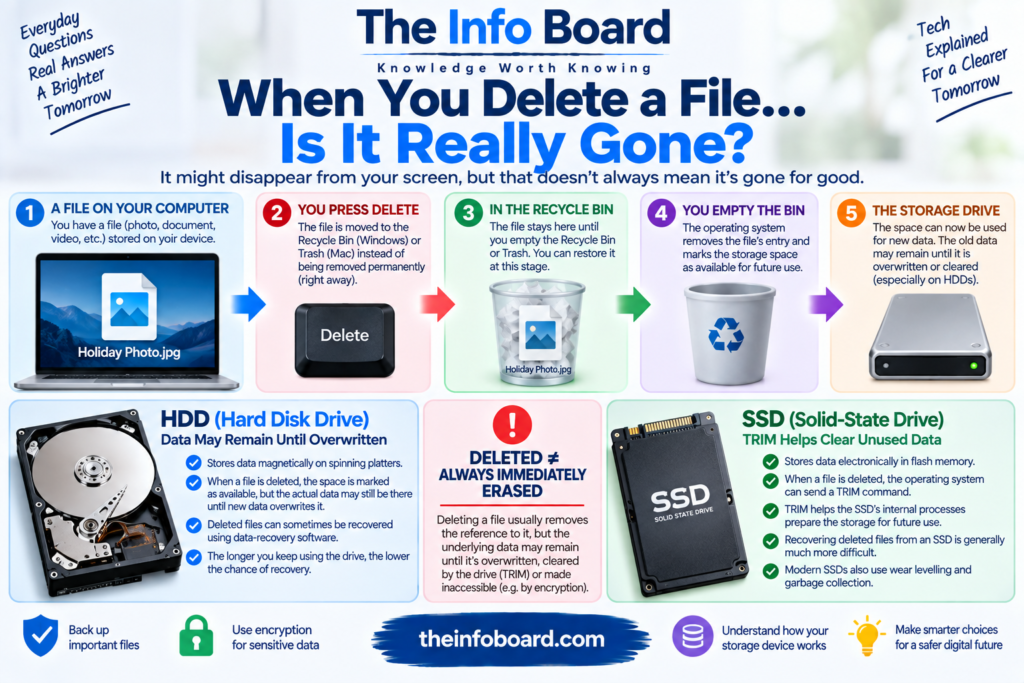
On many storage systems, deleting a file does not instantly wipe all of its underlying data. Instead, the system changes information that tells the computer where the file is and marks some of its storage space as available for future use.
Until that space is overwritten or otherwise cleared, some of the old data may remain.
However, modern solid-state drives, encryption and features such as TRIM make the situation more complicated than the traditional explanation suggests.
So what actually happens when you delete a file?
Let’s follow the process from beginning to end.
What Is a File?
Before understanding deletion, it helps to understand what a file actually is.
A file is organised digital information stored on a device.
It could contain:
- a photograph,
- a document,
- a video,
- a program,
- a spreadsheet,
- or almost any other form of digital data.
Your operating system also stores information about the file.
This can include details such as its:
name, location, size, timestamps and where its data is stored.
The system uses this information to find the file when you open it.
Deleting a file changes this relationship.
What Happens When You Press Delete?
On many desktop computers, pressing Delete doesn’t immediately remove the file permanently.
Instead, the operating system moves it to a temporary location.
On Windows, this is commonly called the Recycle Bin.
On macOS, it is called the Trash.
The file can normally be restored from there.
This is essentially a safety feature.
If you accidentally delete an important photograph or document, you have an opportunity to recover it without specialist software.
At this stage, the file is definitely not truly gone.
What Happens When You Empty the Recycle Bin?
This is where things become more interesting.
A traditional simplified explanation is that the operating system removes or updates the filesystem information used to locate the file and marks the space occupied by its data as available.
Imagine a library.
Instead of immediately destroying a book, the librarian removes its entry from the catalogue and says:
“This shelf space can now be used for another book.”
The old book may still physically be sitting there for a while.
But as far as the catalogue is concerned, the space is available.
Digital storage can behave somewhat similarly.
Why Doesn’t the Computer Immediately Erase Everything?
Efficiency is one reason.
Suppose you delete a 20 GB video.
The computer doesn’t necessarily need to overwrite every bit of that 20 GB immediately just to make the space reusable.
It can update the relevant filesystem information and treat the storage area as available.
When new information eventually needs that space, the old data can be replaced or otherwise become inaccessible.
This can make ordinary deletion much faster.
Can a Deleted File Be Recovered?
Sometimes.
This is the principle behind data-recovery software.
If the system has marked a file’s space as available but the underlying data hasn’t yet been overwritten or otherwise discarded, recovery tools may be able to identify and reconstruct some or all of it.
But recovery is never guaranteed.
The longer you continue using the device, the greater the chance that new data or storage-management processes will affect the deleted information.
And modern SSDs introduce another important factor:
TRIM.
What Is TRIM?
TRIM is a command used with solid-state storage that allows an operating system to tell an SSD which blocks of data are no longer needed.
This matters because SSDs manage data differently from traditional mechanical hard drives.
When you permanently delete a file, the operating system can inform the SSD that the corresponding data is no longer required.
The SSD can then prepare those storage areas for future use through its internal management processes.
As a result, recovering deleted files from an SSD can be much more difficult than the traditional “the data stays there until something overwrites it” explanation suggests.
What Is the Difference Between an HDD and an SSD?
A traditional hard disk drive, or HDD, stores data magnetically on spinning platters.
A solid-state drive, or SSD, stores data electronically in flash memory and has no spinning disk.
Both can store the same types of files, but their internal operation is very different.
This difference affects:
speed, durability, power consumption and deletion behaviour.
Traditional recovery explanations were largely developed around magnetic hard drives.
Modern SSDs require a more nuanced explanation because of TRIM, garbage collection, wear levelling and other internal processes.
What Is Overwriting?
Overwriting occurs when new data replaces storage previously occupied by other information.
Suppose a deleted photograph occupied a particular area of a hard drive.
The operating system marks that area as available.
Later, you download a large video.
Part of the video may be stored in the space previously associated with the photograph.
Once the old information has been overwritten, recovering the original photograph becomes much more difficult and may be impossible from those overwritten areas.
Why Should You Stop Using a Drive After Accidental Deletion?
If you’ve accidentally deleted something genuinely important from a storage device, continuing to use that device can reduce the chance of successful recovery.
Every new action could potentially create data.
Installing recovery software onto the same drive, downloading files, updating applications or even normal operating-system activity may use available storage.
That’s why professional recovery guidance often emphasises minimising further writes to the affected device.
If the information is extremely valuable, professional data recovery may be preferable to experimenting repeatedly.
Is Formatting the Same as Deleting?
Not exactly.
Formatting prepares a storage device or partition to use a filesystem.
But there are different kinds of formatting operations.
A quick format may primarily recreate filesystem structures without deliberately overwriting every part of the storage medium.
A more thorough erase operation may perform additional work.
The exact behaviour depends on:
the operating system, filesystem, storage technology and erase method.
Therefore, you shouldn’t assume that every process labelled “format” provides secure data destruction.
What Is a File System?
A filesystem is the structure an operating system uses to organise and keep track of stored information.
Common examples include:
NTFS, APFS, exFAT and ext4.
The filesystem helps the computer understand:
- which files exist,
- where their data is located,
- how large they are,
- which folders contain them,
- and which areas of storage are available.
When a file is deleted, changes to these organisational structures are a major part of the process.
The underlying storage and filesystem work together, but they aren’t the same thing.
Read:What Is Bluetooth and How Does It Actually Work?
Why Can Recovery Software Find Files Without Their Original Names?
Sometimes the metadata describing a deleted file is lost or changed while portions of the actual content remain.
Recovery software may search the storage device for recognisable patterns associated with particular file formats.
For example, some file formats contain characteristic structures that can help software identify them.
The program might recover a photograph without knowing that its original name was:
summer-holiday.jpg
Instead, it may assign a generic name such as:
recovered-file-001.jpg
The content survived, but some information describing the file did not.
Can Part of a File Be Recovered?
Yes.
Files aren’t always stored as one perfectly continuous block of data.
Depending on the filesystem and storage conditions, portions of a file may be located in different places.
If some of those areas remain intact while others have been reused, recovery software might retrieve only part of the original information.
A partially recovered photograph might be corrupted.
A recovered video might stop playing halfway through.
A document may refuse to open.
This is why finding traces of a deleted file doesn’t necessarily mean the complete file can be restored.
What Is Secure Deletion?
Secure deletion aims to make deleted information impractical or impossible to recover through ordinary means.
Historically, with magnetic hard drives, this often involved deliberately overwriting storage locations containing sensitive information.
But modern SSDs complicate this approach.
Because SSD controllers use technologies such as wear levelling, software may not have simple direct control over the exact physical flash cells containing particular data.
For SSDs, manufacturer-supported secure erase or sanitisation mechanisms may be more appropriate when a full device needs to be cleared.
The correct method depends on the storage technology and the reason for deletion.
What Is Wear Levelling?
Flash-memory cells have limited write endurance.
If an SSD repeatedly wrote to exactly the same physical cells, those cells could wear out sooner than others.
To help prevent this, SSD controllers distribute writes across the available flash memory.
This is called wear levelling.
From the user’s perspective, a file appears to occupy ordinary logical storage locations.
Internally, however, the SSD controller manages where data is physically placed.
This is one reason secure deletion on an SSD isn’t always as simple as repeatedly overwriting one apparent file location.
What Is Garbage Collection on an SSD?
SSDs also perform internal housekeeping known as garbage collection.
Flash storage has constraints on how data can be erased and rewritten.
The SSD controller reorganises valid data and prepares blocks so they can be reused efficiently.
TRIM can help this process by informing the SSD which data the operating system no longer considers necessary.
Much of this work happens invisibly.
You delete a file.
The operating system updates its records.
The SSD receives information about unused data.
The controller then manages the physical flash storage internally.
Does This Mean SSD Files Are Impossible to Recover?
No.
You shouldn’t assume either extreme.
It’s inaccurate to say:
“Deleted files can always be recovered.”
It’s also inaccurate to say:
“Deleting from an SSD always destroys the file instantly.”
Recovery depends on many factors, including:
whether TRIM is enabled, the filesystem, drive behaviour, encryption, elapsed time, subsequent activity and the circumstances of the deletion.
The practical lesson is simple:
If you accidentally delete important information, act quickly and avoid unnecessary use of the storage device.
What Happens When You Delete a File From Cloud Storage?
Cloud storage adds another layer.
When you delete a file from a cloud service, it may first move into an online Trash, Bin or Recently Deleted area.
The provider may retain it there for a certain period.
Even after permanent deletion from your account, the provider’s backend systems may handle copies and backups according to its own retention policies.
The details vary between services.
So deleting a cloud file is not necessarily identical to deleting a file from a local hard drive.
What Happens When You Delete a Photo From Your Phone?
That depends on the device and applications you’re using.
Many modern photo applications have a Recently Deleted folder.
A deleted image may remain recoverable there for a limited period.
If cloud photo synchronisation is enabled, deleting a photograph on one device may also synchronise that deletion across other devices.
That’s convenient when intentional.
It’s potentially disastrous when accidental.
Before deleting a large collection of photographs, understand whether your devices are synchronised.
Is a Backup the Same as the Original File?
No.
A backup is a separate copy intended to help recover information if the primary copy is lost, damaged or deleted.
Good backups are one of the strongest protections against accidental deletion.
For important data, relying on only one copy is risky.
Storage devices fail.
Phones get lost.
Files become corrupted.
People make mistakes.
Malware can also damage information.
A backup provides another route to recovery.
Can Deleted Files Remain in Backups?
Yes.
Deleting the active copy of a file doesn’t necessarily remove historical copies stored in backups.
Whether the deleted file remains available depends on the backup system and its retention policy.
This is useful when deletion was accidental.
But it also matters when you’re intentionally trying to remove sensitive information.
You may need to consider:
local copies, cloud copies, synchronised devices and backups.
“Delete” can mean different things in each location.
What Happens When You Factory Reset a Phone?
A factory reset is designed to return a device to a state suitable for reconfiguration.
On modern devices that use strong storage encryption, deleting the encryption keys can play an important role in making previously stored user data inaccessible.
But exact behaviour varies by device, operating system and implementation.
If you’re selling or giving away a device, follow the manufacturer’s current official instructions for securely erasing and preparing that specific device.
Don’t assume manually deleting your photos and messages one by one is equivalent to properly resetting it.
What Is Encryption?
Encryption transforms readable data into a form that cannot normally be interpreted without the correct cryptographic key.
Modern operating systems increasingly use storage encryption.
This changes the data-deletion picture significantly.
If encrypted data remains physically present but the necessary encryption key has been securely destroyed, recovering the raw bits may not provide usable information.
This concept is sometimes used in cryptographic erasure.
Instead of attempting to overwrite every piece of encrypted information individually, securely destroying the key can render the protected data inaccessible.
Should You Destroy an Old Hard Drive?
Usually not for ordinary reuse.
If you’re keeping the device yourself, normal deletion or formatting may be appropriate depending on your goal.
If you’re selling or donating a device, use an appropriate secure-erasure method for that specific storage technology.
For highly sensitive information, organisations may follow formal data-destruction policies that can include physical destruction.
But ordinary consumers shouldn’t start smashing drives unnecessarily.
Electronic devices can contain sharp materials, batteries or other components that require proper handling.
Use appropriate electronic-waste recycling services when disposing of hardware.
Can You Recover Files After Emptying the Recycle Bin?
Potentially, yes — particularly under some circumstances involving traditional hard drives.
Emptying the Recycle Bin tells the operating system that those files no longer need to be retained through that recovery mechanism.
It doesn’t necessarily mean every underlying bit is immediately overwritten.
But the chance of recovery depends on the storage technology and what happens afterward.
If the file matters, don’t assume:
“I can recover it later.”
Recovery should be treated as a possibility, not a backup strategy.
Why Isn’t Data Recovery Guaranteed?
Many things can happen after deletion.
The storage space may be reused.
The SSD may process TRIM information.
Filesystem metadata may disappear.
Parts of the file may be overwritten.
The device may be physically damaged.
Encryption may prevent access.
Recovery tools also vary in capability.
By the time somebody attempts recovery, the necessary information may simply no longer exist in a usable form.
What’s the Difference Between Delete and Erase?
In everyday conversation, people often use the words interchangeably.
Technically, however, it can be useful to distinguish them.
Delete often means telling the filesystem that a file is no longer required.
Erase can imply taking additional steps to remove or sanitise the underlying data.
But software interfaces don’t always use these terms consistently.
Never assume a button labelled “Erase” follows a particular technical process unless the documentation explains what it does.
Does Deleting a Shortcut Delete the File?
Usually not.
A shortcut is essentially a reference pointing to another location.
Deleting the shortcut removes that reference, not necessarily the original item.
This is similar to removing a sign pointing toward a building.
The sign disappears.
The building remains.
However, interfaces vary, so always check what you’re deleting before confirming.
What Happens If You Delete a Program?
Uninstalling a program is different from simply deleting one of its files.
Applications can store components in multiple locations.
An uninstaller may remove:
program files, configuration information, services and other application components.
Even then, some settings, user data or temporary files may remain.
That’s why uninstalling software and manually dragging one program file into the Trash aren’t always equivalent operations.
Read:What Is Airplane Mode and What Does It Actually Do?
Why Does Free Space Increase Immediately?
You might delete a huge file and see your available storage increase almost instantly.
How can that happen if the computer hasn’t necessarily overwritten all the data?
Because the operating system can simply mark the relevant storage as available for reuse.
It doesn’t need to wait for every old bit to be physically replaced before reporting that space as free.
“Free” therefore means approximately:
available for the system to use again.
It doesn’t necessarily mean:
every previous physical trace has already vanished.
How Should You Protect Important Files?
The safest strategy isn’t relying on recovery software after something goes wrong.
It’s having backups before the problem occurs.
For valuable information, consider keeping multiple copies and ensuring that at least one backup isn’t dependent on the same physical device.
For especially important data, a common principle is the 3-2-1 backup approach:
3 copies of your data
2 different types of storage
1 copy kept separately or off-site
The exact strategy can vary, but the principle is valuable:
don’t let one failure destroy every copy.
A Simple Way to Think About File Deletion
Imagine writing information on a whiteboard.
Traditional permanent deletion can sometimes be thought of less like immediately scrubbing the board clean and more like putting a note beside the writing saying:
“This space may now be reused.”
Eventually, someone writes something new over it.
With modern SSDs, however, there may also be a cleaner working behind the scenes preparing unused sections of the board for future writing.
And with encryption, the writing might effectively be in a secret language whose key can be destroyed.
That’s why modern deletion isn’t described accurately by one simple rule.
The Bottom Line
Deleting a file does not always mean its underlying data disappears instantly.
When you delete a file normally, it may first move to the Recycle Bin, Trash or Recently Deleted folder.
When you permanently delete it, the filesystem may mark its storage as available for reuse.
On traditional hard drives, some underlying data may remain until it is overwritten, which can sometimes make recovery possible.
On SSDs, technologies such as TRIM, garbage collection and wear levelling change the situation and can make recovery significantly more difficult.
Encryption adds another layer because destroying encryption keys can make remaining encrypted data inaccessible.
Cloud storage is different again because providers may maintain deleted items, synchronised copies or backups according to their own systems and retention policies.
So when you press Delete, the most accurate answer is:
The file may disappear from your view immediately, but what happens to the underlying data depends on where it was stored, how it was deleted and what technology is managing the storage.
And if a file really matters, don’t depend on being able to recover it after deletion.
Back it up before you need the backup.
Frequently Asked Questions
Is a file permanently gone after I empty the Recycle Bin?
Not necessarily. On some storage systems, the space may simply be marked as available for reuse. Recovery may sometimes be possible until the data is overwritten or otherwise discarded.
Can permanently deleted files be recovered?
Sometimes, but there is no guarantee. Recovery depends on the storage device, filesystem, subsequent activity, TRIM, encryption and other factors.
Are deleted SSD files recoverable?
Sometimes, but SSD features such as TRIM and garbage collection can make recovery much more difficult.
What should I do if I accidentally delete an important file?
Stop unnecessary activity on the affected storage device. Check the Recycle Bin, Trash, Recently Deleted folders and backups first. If the data is extremely important, consider professional recovery assistance.
Does formatting a drive permanently erase everything?
Not necessarily. Different formatting and erase procedures behave differently. Use an appropriate secure-erasure method when permanent data removal is required.
Does deleting a cloud file remove it immediately?
Not always. Cloud services may retain deleted files temporarily and may manage backups according to their own retention policies.
Is factory resetting a device enough before selling it?
Modern devices often include secure reset mechanisms, but the correct procedure depends on the device. Follow the manufacturer’s current instructions for erasing and preparing it for a new owner.