Bluetooth is everywhere.
Your wireless headphones use it. Your smartwatch uses it. Your car may use it to connect to your phone. Keyboards, speakers, fitness trackers and game controllers often rely on it too.
You tap Bluetooth, choose a device, and a few seconds later they’re connected.
But what is actually happening?
There is no cable between the devices, and usually no internet connection is required.
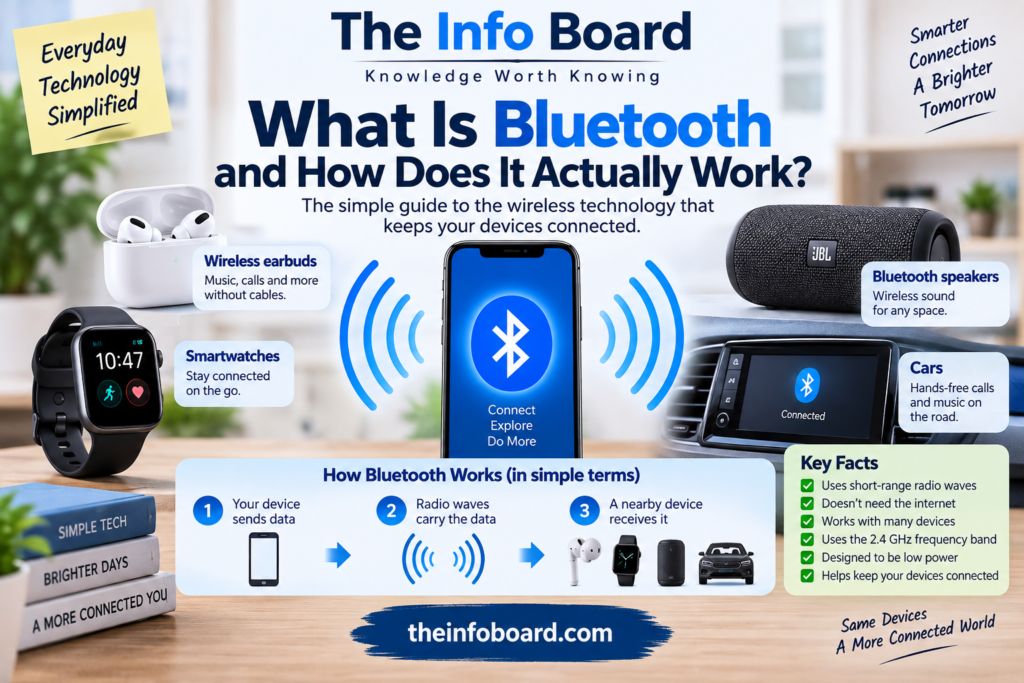
Bluetooth works by using short-range radio waves to allow nearby electronic devices to communicate wirelessly.
Here’s how it works.
What Is Bluetooth?
Bluetooth is a wireless communication technology designed primarily for exchanging data over relatively short distances.
Instead of connecting two devices with a physical cable, Bluetooth allows them to communicate using radio signals.
For example, when you connect wireless headphones to your phone, your phone converts audio into digital information and transmits it wirelessly.
The headphones receive that information and turn it into sound.
Bluetooth handles the wireless connection between them.
Does Bluetooth Use the Internet?
No — Bluetooth itself does not require an internet connection.
Two Bluetooth devices can communicate even when there is no Wi-Fi or mobile data available.
For example, you can connect Bluetooth headphones to your phone while you’re on an aeroplane with no internet connection.
The phone and headphones communicate directly.
However, the app or service you’re using may still require internet access.
If you’re streaming music, for example, the streaming service needs an internet connection unless the music has already been downloaded.
Bluetooth simply carries the audio from your phone to your headphones.
How Does Bluetooth Send Information?
Bluetooth uses radio waves.
Most traditional Bluetooth communication operates in the 2.4 GHz ISM band, a portion of radio spectrum also used by several other technologies.
A Bluetooth device contains a small radio transmitter and receiver.
When two compatible devices establish a connection, information can be encoded into radio signals and transmitted through the air.
The receiving device detects those signals and reconstructs the data.
All of this happens extremely quickly.
Why Doesn’t Bluetooth Need an Antenna Sticking Out?
It does use an antenna — you just normally can’t see it.
Modern Bluetooth antennas can be extremely small and are usually built inside the device.
Your smartphone contains several antennas for different wireless systems, potentially including:
Wi-Fi, Bluetooth, cellular networks, GPS/GNSS and NFC-related hardware.
Manufacturers carefully position these components inside phones and other devices.
So Bluetooth still relies on an antenna.
It’s simply hidden inside the product.
What Happens When You Pair Two Bluetooth Devices?
When you connect two Bluetooth devices for the first time, they normally go through a process called pairing.
Suppose you’re connecting new headphones.
First, the headphones enter a discoverable or pairing mode.
Your phone scans for nearby Bluetooth devices.
The headphones advertise their presence.
Your phone identifies them and displays their name.
You select the headphones.
The devices then establish the information necessary to create a trusted connection.
After successful pairing, they can usually recognise each other again later.
That’s why you don’t normally have to manually configure your headphones every morning.
Why Do Bluetooth Devices Reconnect Automatically?
Once devices have been paired, they can store information about that relationship.
When both devices are switched on and Bluetooth is enabled, they may recognise each other and reconnect automatically.
For example:
You take your wireless earbuds out of their charging case.
They switch on.
Your phone notices them.
The devices recognise their previous pairing.
The connection is restored.
What feels instantaneous to you actually involves several automated communication steps.
Why Is It Called Bluetooth?
The name has an unusual history.
Bluetooth was named after Harald “Bluetooth” Gormsson, a 10th-century Danish king associated with uniting parts of Denmark and Norway.
The technology’s name was inspired by the idea of uniting different communication technologies.
Even the Bluetooth logo reflects this history.
It combines runic characters associated with Harald Bluetooth’s initials.
A modern wireless technology therefore carries the nickname of a Viking-age king.
How Far Does Bluetooth Work?
There isn’t one universal Bluetooth range.
Range depends on several factors, including:
the Bluetooth implementation, transmitter power, receiver sensitivity, antennas, obstacles and surrounding radio interference.
Some consumer devices are designed primarily for short distances, while certain Bluetooth implementations can operate over considerably longer ranges under suitable conditions.
Walls, furniture, people and other objects can weaken radio signals.
That’s why headphones might work perfectly when your phone is on the table but begin cutting out when you walk several rooms away.
Why Does Bluetooth Sometimes Cut Out?
Bluetooth signals aren’t travelling through an empty environment.
Homes and offices are filled with objects and other radio transmissions.
Bluetooth performance can be affected by:
distance, walls, interference, device positioning and competing radio activity.
The 2.4 GHz spectrum is particularly busy because technologies including Wi-Fi can also operate there.
Bluetooth technologies use sophisticated techniques to maintain reliable connections despite this crowded environment, but interference can still happen.
What Is Frequency Hopping?
One important technique associated with Bluetooth is frequency hopping.
Instead of permanently transmitting on just one narrow radio channel, Bluetooth communication can move among frequencies according to defined procedures.
This helps Bluetooth operate in the crowded 2.4 GHz band.
If part of the spectrum is experiencing interference, changing frequencies can help maintain communication.
Modern Bluetooth systems use mechanisms designed to coexist with other wireless technologies.
Bluetooth Classic vs Bluetooth Low Energy
Not all Bluetooth communication works in exactly the same way.
Two important forms are commonly discussed:
Bluetooth Classic and Bluetooth Low Energy (BLE).
Bluetooth Classic has historically been widely used for applications such as continuous audio connections.
Bluetooth Low Energy was designed to support communication with much lower power consumption for many applications.
BLE is particularly useful for devices that may need to run for long periods from small batteries.
Why Is Bluetooth Low Energy Important?
Imagine a small temperature sensor.
It doesn’t need to continuously stream music or transfer huge files.
It may simply need to report:
21.4°C
and then wait before sending another measurement.
Keeping a powerful radio connection active continuously would waste energy.
Bluetooth Low Energy allows devices to communicate in ways designed to reduce power consumption.
That’s particularly useful for devices such as:
fitness trackers, sensors, smart-home products and other battery-powered electronics.
How Do Bluetooth Headphones Work?
When you’re listening to music through Bluetooth headphones, several things happen.
Your phone obtains the audio data from a stored file or streaming service.
The audio is encoded into a suitable digital format for transmission.
Bluetooth transports the information wirelessly.
The headphones receive and decode it.
Their electronics convert the digital information into an electrical signal.
The headphone drivers then convert that electrical signal into sound waves.
The whole process happens fast enough that the music appears continuous.
Read:What Is a VPN and What Does It Actually Do?
Why Can Bluetooth Audio Have a Delay?
Wireless audio processing isn’t instantaneous.
The audio may need to be:
encoded → transmitted → received → decoded → played.
Each stage can introduce a small amount of latency.
For ordinary music listening, that delay often doesn’t matter.
But it can become noticeable when watching video or playing games, where sound needs to correspond closely with what happens on screen.
Modern devices and audio technologies can reduce latency, but wireless transmission and processing still take time.
Why Does Bluetooth Affect Sound Quality?
Bluetooth audio usually involves an audio codec.
A codec is a system used to encode and decode digital audio.
Different Bluetooth audio implementations can support different codecs and capabilities.
Factors such as codec choice, bitrate, connection conditions and the headphones themselves can influence the final listening experience.
However, Bluetooth technology has improved substantially over time, and modern wireless headphones can provide very good audio quality.
Does Bluetooth Drain Your Phone Battery?
Yes, Bluetooth uses energy because your phone must power its radio hardware and process communications.
However, modern Bluetooth systems — particularly Bluetooth Low Energy — are designed with power efficiency in mind.
Simply leaving Bluetooth enabled doesn’t necessarily mean enormous battery consumption.
The actual energy use depends heavily on what the connection is doing.
Continuously streaming audio requires more activity than occasionally communicating with a small sensor.
Is Bluetooth the Same as Wi-Fi?
No.
Both use radio waves, and both can operate in the 2.4 GHz spectrum, but they serve different purposes.
Wi-Fi is commonly used to connect devices to local networks and the internet while supporting relatively high data throughput.
Bluetooth is generally designed for direct, relatively short-range connections between devices, often with lower power requirements.
A smartphone can use both simultaneously.
For example:
Wi-Fi: downloads a song from the internet.
Bluetooth: sends that song from the phone to your headphones.
Two wireless technologies, two different jobs.
Is Bluetooth the Same as NFC?
No.
NFC — Near Field Communication — is designed for extremely short-range communication.
It’s commonly associated with things such as contactless payments and tapping devices together.
Bluetooth generally works across much greater distances and supports different types of ongoing communication.
Interestingly, NFC can sometimes be used to simplify the process of establishing another type of wireless connection.
Can Bluetooth Transfer Files?
Yes.
Bluetooth can support file and data transfer between compatible devices.
However, for large files, other technologies may be considerably faster.
Bluetooth is particularly valuable when convenience, compatibility and relatively low power consumption matter more than transferring enormous amounts of data as quickly as possible.
Is Bluetooth Secure?
Bluetooth includes security mechanisms, but security depends on the Bluetooth version, implementation, configuration and how devices are used.
Modern pairing methods can use authentication and encryption to protect communication.
However, users should still follow sensible practices.
Avoid pairing with unknown devices.
Keep phones and computers updated.
Remove devices you no longer recognise or use.
Don’t accept unexpected Bluetooth connection requests.
Security isn’t just about the wireless standard — it’s also about how devices implement and use it.
Can Someone Connect to Your Phone Without Permission?
Normally, Bluetooth devices don’t simply give every nearby stranger unrestricted access.
Pairing and permission mechanisms are designed to prevent that.
However, software vulnerabilities and poorly configured devices can create risks.
That’s one reason operating-system and device updates matter.
If a device no longer receives security updates, its risk profile can change over time.
Should You Turn Bluetooth Off When You’re Not Using It?
You can, particularly if you have no reason to use it.
Turning off unused wireless interfaces can reduce unnecessary exposure and may save some power.
But for many modern phones, leaving Bluetooth enabled is normal because numerous features depend on it.
The more important practices are keeping devices updated, avoiding suspicious pairing requests and understanding which devices are connected.
Why Does Bluetooth Sometimes Show Strange Device Names?
When your phone scans for Bluetooth devices, nearby devices advertise identifying information.
Manufacturers can assign device names such as:
WH-1000XM, BT Speaker, Car Audio, or something equally mysterious.
Some devices allow owners to rename them.
That’s why a Bluetooth menu can sometimes look like a collection of random letters and numbers.
Your phone is essentially showing the identifiers being advertised by nearby devices.
Can Bluetooth Work Through Walls?
Yes, but walls weaken radio signals.
How much depends on the wall.
Drywall may have a relatively modest effect compared with thick concrete, metal structures or other dense materials.
Radio signals can also reflect and take multiple paths through an environment.
This means Bluetooth range in a real building can differ substantially from an ideal open-space measurement.
Read:How Does Wi-Fi Actually Work? A Simple Explanation
Why Do Bluetooth Earbuds Work When Your Phone Is in Your Pocket?
Radio waves can travel through and around many everyday materials.
The distance from your pocket to your ears is also extremely short.
However, the human body contains a lot of water, and the body can affect 2.4 GHz radio propagation.
This is one reason some wireless devices can behave slightly differently depending on where the phone or wearable is positioned.
Can Bluetooth Work Without Mobile Signal?
Absolutely.
Bluetooth communication does not depend on a mobile network.
You could be somewhere with:
no 4G, no 5G, no Wi-Fi and no internet connection
and still connect Bluetooth headphones to your phone.
The devices communicate directly over their Bluetooth radio link.
Why Is Bluetooth in So Many Devices?
Bluetooth became successful because it solves a very common problem:
How can nearby electronic devices communicate without cables?
It’s standardised, widely supported and can be implemented in very small devices.
A single smartphone can potentially communicate with headphones, a car, a watch, a keyboard, medical accessories and other compatible equipment using the same broad wireless technology family.
That interoperability is extremely valuable.
The Bottom Line
Bluetooth is a short-range wireless communication technology that allows nearby devices to exchange information using radio waves.
When you pair your headphones with your phone, the devices establish a relationship that allows them to recognise and communicate with each other.
The connection does not inherently require Wi-Fi, mobile data or the internet.
Bluetooth simply creates a wireless link between compatible devices.
And the technology has become so seamless that we barely notice the complicated radio communication happening every time we put on a pair of wireless headphones.
Frequently Asked Questions
What is Bluetooth?
Bluetooth is a wireless technology that allows compatible electronic devices to communicate over relatively short distances using radio waves.
Does Bluetooth need Wi-Fi?
No. Bluetooth devices can communicate directly without Wi-Fi or an internet connection.
Does Bluetooth use mobile data?
Bluetooth itself does not use your mobile data allowance. However, an app sending content over Bluetooth may separately obtain that content through the internet.
Why is Bluetooth called Bluetooth?
The technology was named after Harald “Bluetooth” Gormsson, a 10th-century Danish king. The name reflected the idea of bringing different technologies together.
What’s the difference between Bluetooth and Wi-Fi?
Wi-Fi is commonly used for high-speed network and internet connectivity. Bluetooth is generally used for shorter-range direct connections between devices.
Can Bluetooth work through walls?
Yes, although walls and other obstacles can weaken the radio signal and reduce range or reliability.
Is Bluetooth secure?
Bluetooth includes security mechanisms such as authentication and encryption, but users should keep devices updated and avoid unknown pairing requests.
External sources: Bluetooth SIG — Learn About Bluetooth and Bluetooth SIG — The Origin of the Bluetooth Name.