Online shopping makes it possible to buy almost anything within minutes.
Unfortunately, it also makes it easy for fake shops and scam websites to reach thousands of people.
A website can look professional, display attractive products, show customer reviews and even have a padlock beside its address — and still be untrustworthy.
Before entering your card details, there are several checks you can make.
None of them is perfect on its own. But when you combine them, suspicious websites become much easier to spot.
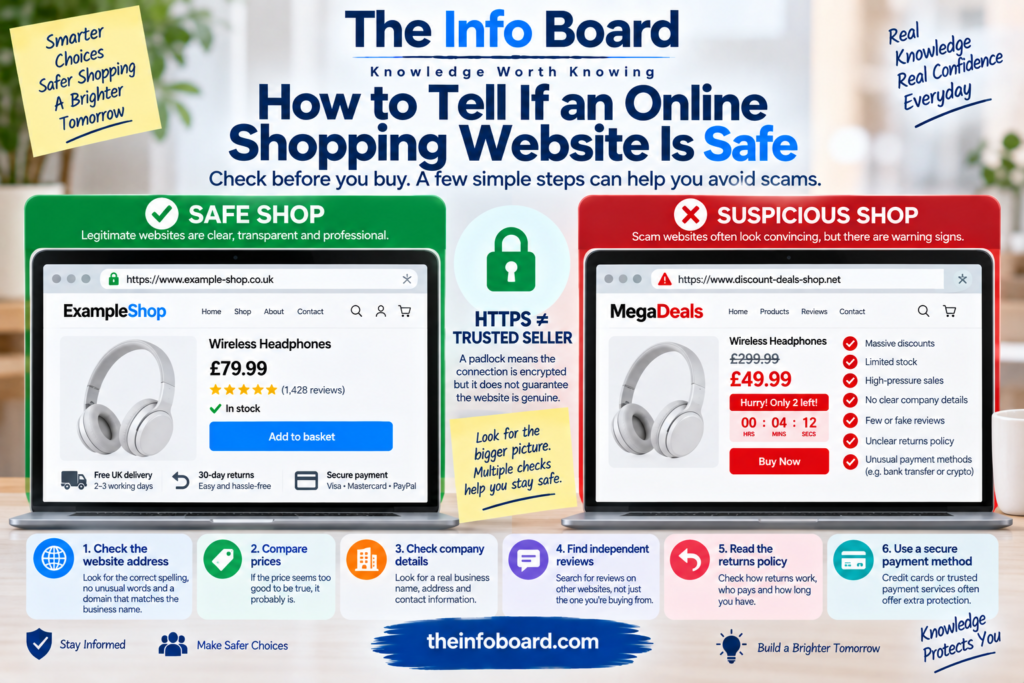
1. Check the Website Address Carefully
Start with the URL in your browser’s address bar.
Scammers often create domain names that resemble legitimate companies.
For example, instead of a company’s genuine domain, a fraudulent site might use something like:
brand-clearance-shop.example
or deliberately misspell a familiar name.
Look for:
- misspelled company names,
- unnecessary words or characters,
- unusual subdomains,
- strange domain endings,
- and a domain that doesn’t match the business name.
Don’t assume a website is genuine simply because its design contains the logo of a well-known company.
Logos can be copied easily.
2. Don’t Trust the Padlock Alone
You may have heard that a padlock in your browser means a website is safe.
That’s an oversimplification.
The padlock generally indicates that the connection between your browser and the website is encrypted using HTTPS.
That’s important because it helps protect information while it travels between you and the site.
But HTTPS does not prove that the business itself is trustworthy.
A scam website can also use HTTPS.
Think of encryption as protecting the conversation — not proving who deserves your trust.
3. Look at the Prices
Extremely low prices are one of the easiest ways to attract victims.
Suppose a product normally sells for £300.
You discover an unfamiliar website offering the exact same item for £49.
Could it be a genuine clearance?
Possibly.
But the larger the difference from normal market prices, the more carefully you should investigate.
Scammers know that excitement can make people act quickly.
Ask yourself:
“Does this price realistically make sense?”
If the offer seems extraordinary, don’t let the discount prevent you from checking the seller.
4. Watch for Artificial Urgency
Some websites try to stop you thinking by creating pressure.
You might see:
ONLY 2 LEFT!
SALE ENDS IN 4 MINUTES!
17 PEOPLE ARE VIEWING THIS ITEM!
BUY NOW BEFORE THE PRICE INCREASES!
Legitimate retailers also use urgency-based marketing, so these messages don’t automatically indicate fraud.
But aggressive urgency combined with other warning signs should make you cautious.
A trustworthy purchase shouldn’t depend on preventing you from performing basic checks.
5. Check the Contact Information
Look for a genuine contact page.
A legitimate retailer will often provide information such as:
a business name, email address, physical address and customer-support details.
Then check whether those details make sense.
If a company claims to be a major UK retailer but provides no business address or meaningful contact information, investigate further.
Also be cautious when the only contact option is a generic form with no identifiable company behind it.
6. Search the Address
If the website provides a physical address, search for it independently.
Does the address actually exist?
Does it correspond to the business?
A supposed electronics retailer might list an address that turns out to be:
a residential property, unrelated business or nonexistent location.
That doesn’t automatically prove fraud — small businesses can operate from homes — but inconsistencies deserve investigation.
The important word is independently.
Don’t rely exclusively on information supplied by the website you’re trying to verify.
7. Search for the Company Separately
Open a new browser tab and search for the company name.
Try searches such as:
company name reviews
company name scam
company name complaints
company name returns
Look for information from multiple independent sources.
Don’t stop after finding one positive review.
You are looking for patterns.
Repeated reports of customers receiving nothing, counterfeit products, unexplained charges or impossible refunds are serious warning signs.
Read:How to Tell If a Website Is Safe Before You Use It
8. Be Careful With Reviews on the Website Itself
A page filled with five-star reviews can look reassuring.
But remember:
the website controls what appears on its own pages.
A dishonest operator can write fake testimonials just as easily as it can upload product photographs.
Look for independent evidence.
Even external reviews aren’t automatically trustworthy because review manipulation exists.
But comparing several sources gives you more information than relying on testimonials controlled by the seller.
9. Examine the Reviews More Closely
Suspicious reviews sometimes have recognisable patterns.
For example:
“Amazing product!!! Best company ever!!!”
Repeated dozens of times with little detail.
Look for reviews discussing specific experiences:
delivery times, product quality, customer support, refunds and problems.
Also check the dates.
A company with hundreds of glowing reviews all appearing within a very short period deserves closer examination.
Again, no single pattern proves fraud.
You’re building an overall picture.
10. Check How Old the Website Is
A newly registered domain isn’t automatically fraudulent.
Every legitimate website was new once.
But domain age can provide useful context.
Suppose a website claims:
“Serving customers worldwide since 2008.”
Yet independent domain-registration information suggests the domain appeared only recently.
That’s an inconsistency worth investigating.
The important issue isn’t simply that the website is new.
It’s whether its claims match the available evidence.
11. Look at the About Page
Scam websites sometimes create convincing homepages but pay less attention to secondary pages.
Read the About page carefully.
Watch for:
vague company history, strange grammar, inconsistent business names or text that appears unrelated to the products being sold.
Sometimes copied website templates contain leftover information from another business.
For example, a supposed clothing retailer might suddenly mention industrial equipment in its About section.
That’s a major warning sign.
12. Read the Returns Policy
Before buying, find out:
How long do you have to return something?
Who pays return postage?
Where must returns be sent?
Are refunds available?
Are there exclusions?
A website may appear to be based in your country while requiring returns to be shipped internationally at the customer’s expense.
That can turn a cheap purchase into an expensive problem.
Read the policy before paying, not after something goes wrong.
13. Check the Shipping Information
Look for realistic delivery information.
Be cautious if the website claims:
free worldwide next-day delivery
on products that would normally be expensive or difficult to ship.
Also look for contradictions.
One page might promise delivery in three days while another says orders can take several weeks.
Poorly assembled scam sites often contain inconsistent information across different pages.
14. Check the Language and Design — But Don’t Rely on Them
Poor spelling, broken pages and low-quality images can be warning signs.
However, don’t make the opposite mistake:
a beautiful website isn’t proof of legitimacy.
Modern website templates make professional-looking shops easy to build.
Generative AI can also produce convincing product descriptions, graphics and marketing copy quickly.
Judge the business behind the website, not simply the appearance of the website.
15. Check the Social Media Links
Many online shops display icons for Instagram, Facebook, X or other platforms.
Click them.
Do they actually lead to the company’s accounts?
Sometimes scam templates display social-media icons that:
don’t work, return to the homepage or lead to unrelated accounts.
If accounts exist, examine their history.
A business claiming years of trading but having social accounts created very recently with almost no genuine interaction deserves additional scrutiny.
16. Look for Copied Product Images
Suspicious shops often copy photographs from legitimate retailers.
You can sometimes use reverse-image search tools to see where else a product image appears online.
If the same photographs belong to an established retailer while an unknown site claims they’re its own products, investigate carefully.
Image copying alone doesn’t always prove fraud — manufacturers distribute product images to retailers — but context matters.
17. Be Suspicious of Strange Payment Methods
Payment method is one of the most important checks.
Be especially cautious if an online retailer insists on payment methods that make recovering money difficult.
For example, a supposed normal retail store demanding payment through:
cryptocurrency, gift cards or an unusual direct transfer arrangement
should raise questions.
Scammers often prefer payment methods that are difficult to reverse.
18. Credit Card or Debit Card?
Consumer protections vary by country, payment method and transaction.
In the UK, qualifying credit-card purchases may receive protection under Section 75 of the Consumer Credit Act, subject to legal requirements and transaction circumstances.
Debit-card and some other card transactions may potentially be eligible for chargeback processes, but chargeback is different from statutory Section 75 protection.
Don’t assume every card transaction has identical protection.
For significant purchases, understand the protection attached to the payment method you’re using.
UK Example: What If an Online Order Never Arrives?
Imagine you order a desk costing £240 from an online retailer.
You pay a £20 deposit using your credit card and the remaining £220 using your debit card.
The retailer then fails to deliver the desk and refuses to refund you.
Because the desk costs more than £100 and no more than £30,000, you may be able to make a claim under Section 75 of the Consumer Credit Act, even though only £20 was paid by credit card.
If the legal conditions are met, the credit card provider can be jointly responsible with the retailer for a breach of contract or misrepresentation. The potential claim is not necessarily limited to the £20 deposit.
If you paid entirely by debit card, Section 75 would not apply, but you could ask your bank whether a chargeback is available.
Neither route guarantees a successful refund. Eligibility, payment arrangements and the circumstances of the dispute matter.
For details about the rules and how to claim, see MoneyHelper’s guide to Section 75 and chargeback.
19. Be Careful With Bank Transfers
A seller asking for a bank transfer isn’t automatically fraudulent.
Many legitimate businesses accept them.
But bank transfers can carry different protections from card payments.
If an unknown online retailer refuses normal card payments and insists that you transfer money directly to an account, ask why.
The unusual payment request becomes particularly concerning when combined with:
huge discounts + urgency + a new website + limited contact details.
Fraud detection is often about combinations of warning signs.
20. Don’t Buy Through Links in Unexpected Messages
Suppose you receive a text saying:
“Your favourite retailer has a private 80% sale today.”
Instead of tapping the link, open your browser and navigate to the retailer independently.
Fraudulent messages can send you to convincing copies of genuine websites.
The same principle applies to emails, social-media advertisements and messaging apps.
When possible, reach important websites through a route you trust rather than through an unsolicited link.
21. Watch for Lookalike Domains
Lookalike domains are particularly dangerous because they exploit quick reading.
Imagine the genuine site is:
examplebrand.com
A fake version might use a visually similar spelling.
When you’re moving quickly on a phone screen, the difference can be easy to miss.
Before entering:
passwords, card numbers or personal information,
check the domain carefully.
This habit is useful far beyond online shopping.
22. Don’t Reuse Your Password
Suppose the shop isn’t legitimate and you create an account using the same password you use for your email.
You may have given criminals more than an online-shopping password.
They may try the same email-and-password combination on other services.
This is called credential stuffing.
Use a unique password for important accounts, ideally managed with a reputable password manager.
23. Never Give a Shop Your Email Password
An online shop does not need the password to your email account.
It also shouldn’t need:
your online-banking password, card PIN or authentication codes sent by your bank.
If a website asks for information that doesn’t make sense for the transaction, stop.
Ask yourself why the seller would legitimately need it.
24. Be Careful With Verification Codes
Your bank may send you a one-time code or ask you to approve a transaction in its app.
Read the message carefully.
Don’t simply type a code because somebody tells you to.
A scammer communicating with you may attempt to persuade you to authorise something different from what you believe you’re approving.
Always verify:
the amount, merchant and action being authorised.
25. What If Google Shows the Website?
Appearing in search results doesn’t automatically prove a retailer is trustworthy.
Search engines attempt to detect harmful content, but they cannot guarantee that every result is legitimate.
The same applies to online advertising.
A sponsored result is still an advertisement.
Its placement should not replace your own checks.
Read:How to Spot a Phishing Email Before You Click
26. What If the Website Has a Trust Badge?
Some sites display logos saying things such as:
Secure Checkout
100% Protected
Verified Store
A graphic by itself proves very little.
Anyone building a website can upload an image containing those words.
If a badge claims certification from a particular organisation, determine whether the certification can actually be verified through that organisation.
Don’t trust the picture simply because it looks official.
27. Use Your Browser’s Security Warnings
Modern browsers can warn you about websites associated with phishing, malware or other threats.
Don’t casually bypass those warnings.
If your browser displays a prominent security alert, stop and investigate before proceeding.
Security warnings are not something to click through automatically just because you want to reach the page.
28. What Should You Do If You’re Still Unsure?
Don’t buy yet.
That’s one of the simplest and most effective online-shopping safety rules.
A legitimate product can often be found through another established retailer.
The potential saving from a suspicious website may not justify risking:
your money, card details, passwords or personal information.
Take time to investigate.
Scammers benefit from rushed decisions.
29. What If You’ve Already Paid?
If you believe you’ve paid a fraudulent online seller, act promptly. The steps you take may affect your chances of recovering your money.
1. Contact your bank or payment provider immediately.
Use the official banking app, website or a trusted telephone number. Explain what happened and ask whether the payment can be disputed or recovered. If your card details may have been compromised, ask how to protect your account.
2. Check which payment protection applies.
Depending on how you paid, you might be able to use a card chargeback scheme, Section 75 protection for qualifying credit-card purchases, or your payment provider’s dispute process. These protections have different eligibility rules and do not guarantee a refund.
Citizens Advice explains the options in its guide to getting your money back after a scam.
3. Report the suspected fraud.
In England, Wales and Northern Ireland, you can report suspected online shopping fraud through Report Fraud. In Scotland, contact Police Scotland.
4. Protect your information.
If you entered a password on the suspicious website, change it immediately and change any other accounts using the same password. Monitor your bank statements for unfamiliar transactions.
Keep copies of your order confirmation, payment receipt, messages and the seller’s website details. These may help when reporting the incident or discussing a refund with your payment provider.
For additional UK guidance, read the National Cyber Security Centre’s advice on online shopping fraud.
30. What If You Entered Your Password but Didn’t Pay?
Change the password immediately.
If you’ve used the same password elsewhere, change it on those accounts too.
Prioritise sensitive accounts such as:
email, banking and major online services.
Enable multi-factor authentication where appropriate.
Your email account is especially important because access to it can sometimes be used to reset passwords for other services.
A 60-Second Safety Check Before Buying
Before entering your payment details, ask yourself:
Is the domain spelled correctly?
Does the price seem realistic?
Can I identify the company behind the site?
Does its address make sense?
Are there independent reviews?
Is the returns policy clear?
Does the payment method offer appropriate protection?
Is the website pressuring me to act immediately?
Have I reached the site through a trustworthy route?
If several answers concern you, don’t proceed simply because the product is cheap.
The Bottom Line
There is no single symbol, review or technical trick that can guarantee an online shop is safe.
Instead, look for multiple independent signs of legitimacy.
Check the domain.
Investigate the business.
Read the returns policy.
Compare prices.
Research independent reviews.
Use sensible payment methods.
And don’t mistake HTTPS, professional design or a trust badge for proof that the seller is trustworthy.
The strongest warning usually isn’t one strange detail.
It’s a pattern:
an unbelievable price + a newly discovered retailer + weak contact information + pressure to buy immediately + an unusual payment method.
When several warning signs appear together, walking away may be the safest purchase decision you make.
Frequently Asked Questions
Does HTTPS mean an online shop is safe?
No. HTTPS encrypts the connection between your browser and the website, but a fraudulent website can also use HTTPS.
Can fake shopping websites appear on Google?
Yes. Search visibility by itself does not prove that a seller is trustworthy.
Are extremely cheap prices a sign of a scam?
They can be. Large discounts aren’t automatically fraudulent, but prices dramatically below normal market value justify additional checks.
Should I trust reviews displayed on a retailer’s own website?
Don’t rely on them alone. The retailer controls that content, so look for independent information as well.
Is a professional-looking website safe?
Not necessarily. Modern templates make sophisticated websites relatively easy to create.
What should I do if I paid a scam website?
Contact your bank or payment provider promptly through an official channel, explain what happened and follow its instructions.
What if I used the same password on the suspicious website and somewhere else?
Change the reused password on the other accounts promptly, starting with sensitive accounts such as your email.