A message says your bank account is locked, a parcel needs a small delivery fee or an unexpected refund is waiting. The email looks professional, includes a familiar logo and asks you to act immediately. Should you click?
Not before checking. Phishing is a scam in which criminals impersonate trusted people or organisations to obtain passwords, payment details or other information, or persuade someone to install harmful software. Fake messages can look convincing and may use correct spelling, genuine-looking branding and personal details.
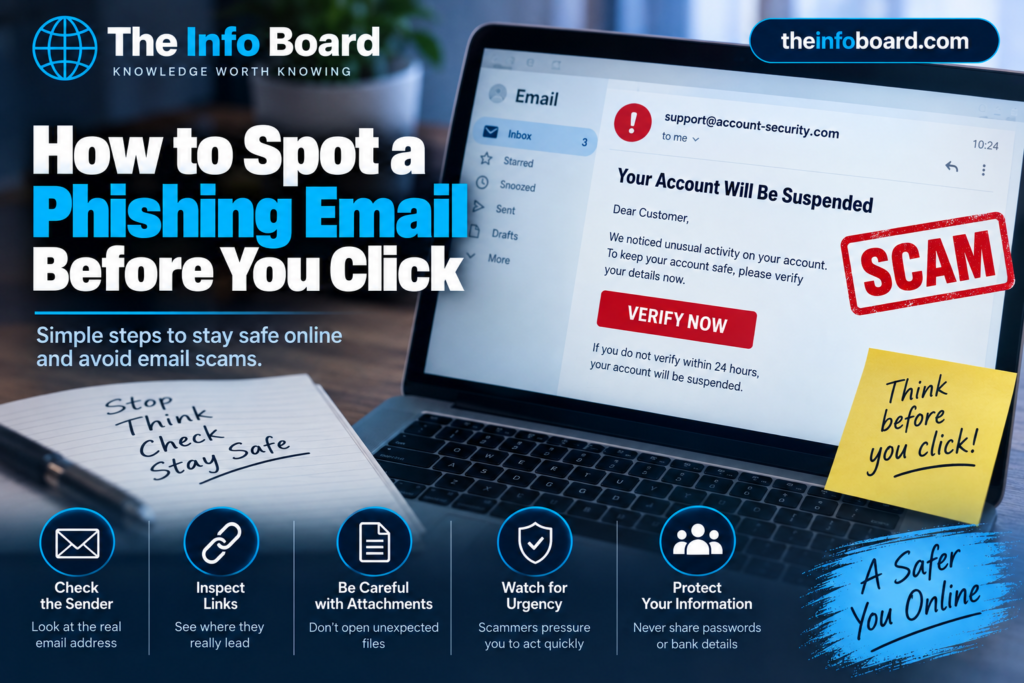
How to Spot a Phishing Email Before You Click
This guide shows you how to recognise common warning signs, verify a message without relying on it, report suspicious emails in the UK, and respond if you have already clicked.
7 warning signs of a phishing email
1. The message pressures you to act immediately
Scammers often manufacture urgency: “Your account will close today”, “Pay this delivery fee now” or “Confirm your identity within 30 minutes”. A genuine warning can also be urgent, so urgency alone is not proof of fraud. It is a reason to verify the claim independently before doing anything.
2. The sender’s actual email address looks wrong
The visible sender name can say “Your Bank” even when the underlying email address is unrelated. Expand the sender details and compare the domain with the organisation’s known, official address. Be aware that email sender details can also be spoofed: a plausible sender address does not guarantee a message is genuine.
For example, a message displaying the name “Example Bank” but originating from alerts@unrelated-example.net deserves scrutiny. This is a fictional illustration, not an actual bank.
3. A link leads somewhere different from where it appears
A button labelled “Verify account” can send you to a different website. On a computer, hovering over a link may reveal its destination. On a phone, previews vary by app, and there is no need to touch a suspicious link simply to investigate it.
Look carefully at the actual website domain. A familiar company name near the start of a long address does not mean the site belongs to that company. For example, bank.example.security-check.example is under security-check.example, not bank.example. These are fictional domains used only to explain the difference.
Safest alternative: open the company’s official app, use an existing bookmark or manually enter its independently verified website address. For more examples, read our guide to checking whether a website is safe.
4. It asks for passwords, security codes or payment details
Be wary of an unexpected request to enter a password, share a one-time login code, update card details, transfer money or pay an invoice. Scammers can use a fake login page to capture what you type, even if the page looks identical to the real service.
Never give a caller or email sender a one-time authentication code simply because they ask. If someone claims to be from your bank, contact the bank through its official app or a trusted number you already have.
5. It contains an unexpected attachment or QR code
An unexpected invoice, delivery document or tax notice may contain a malicious attachment. QR codes can also lead to fraudulent websites; this is sometimes called QR-code phishing or quishing. Do not open or scan something suspicious to see whether it is genuine. First verify the claimed sender by another trusted method.
6. It looks professional but the request does not make sense
Correct spelling, polished design, an official-looking signature or even your full name are not evidence that an email is safe. Criminals can copy branding and obtain personal information from public sources or earlier data breaches.
Ask practical questions: Did you order this parcel? Do you have an account with this service? Did you request a password reset? Is this payment change expected? An unfamiliar or out-of-character request merits an independent check.
7. It asks you to use contact details supplied in the message
Some fraudulent emails replace suspicious links with a telephone number, asking you to call “support”. That number may connect directly to a scammer. Obtain contact details from an official app, a statement you already trust, or a verified website rather than the email itself.
Phishing email examples: what should you do?
| Message you receive | Why to be cautious | Safer next action |
|---|---|---|
| “Your parcel is held. Pay £1.95 now.” | Unexpected fee and payment link | Check the delivery using the retailer’s or courier’s official website |
| “Your bank account is frozen. Verify immediately.” | Urgency and demand for login details | Open your banking app or contact the bank independently |
| “Your manager needs an urgent transfer.” | Unusual payment request, possibly impersonation | Confirm using an established workplace contact method |
| “See the attached unpaid invoice.” | Unexpected attachment or payment instructions | Contact the supplier using details already on file |
| “Scan this code to restore account access.” | QR code may open a fake sign-in page | Visit the account’s official security settings yourself |
These are illustrative scenarios, not proof that every message with similar wording is a scam.
How to check an email without clicking its links
- Stop and read the request. Notice pressure, threats, surprising rewards or requests for sensitive details.
- Inspect sender information. Check the full address, while remembering that apparent sender details can be forged.
- Do not use the message to verify itself. Avoid its links, QR codes, attachments, reply address and phone numbers.
- Open a trusted channel. Use an official app, a saved bookmark or contact details obtained separately.
- Check whether the claimed issue really exists. Look at your actual account, order or transaction history.
- Report the suspicious message. UK residents can use the reporting route below.
The key principle is simple: verify a surprising message through a channel you already trust, not one provided by the message.
How to report a phishing email in the UK
Forward suspicious emails to the UK National Cyber Security Centre’s Suspicious Email Reporting Service at report@phishing.gov.uk. You can report a message even if you are uncertain whether it is a scam. Do not click suspicious links before forwarding it.
See the NCSC’s official instructions for reporting a scam email. The NCSC can analyse reports and may work with hosting companies to remove malicious websites. You do not normally need to forward messages already in your junk or spam folder.
If you have lost money or experienced account compromise, reporting the email alone is not enough. Contact your bank or affected service immediately. In England, Wales and Northern Ireland, report fraud or cybercrime to Report Fraud. In Scotland, report it to Police Scotland, usually via 101 for non-emergencies.
What if you already clicked a phishing link?
What to do depends on what happened, not just whether you opened a page. The NCSC says that if you did not enter personal details, download files or install software, further action may be unlikely to be needed; you should still stay alert to suspicious account activity.
| What happened? | What to do next |
|---|---|
| You opened a page but did not enter details or download anything | Close the page and monitor your accounts for unusual activity |
| You entered a password | Change it using the genuine website or app; replace it anywhere else you reused it and review account sessions |
| You entered a login verification code | Secure the account immediately, review recent sign-ins and contact the service if access may be compromised |
| You supplied bank or card details or sent money | Contact your bank promptly using an official channel; follow its fraud instructions and report any loss |
| You downloaded or installed suspicious software | Follow the NCSC recovery guidance and run an appropriate security scan; if it is a work device, inform your IT team |
The NCSC provides more detailed guidance on responding to phishing and recovering after a suspicious interaction.
Reduce the damage if a password is stolen
Use a different password for every important account, especially your primary email account. A reputable password manager can help generate and remember unique passwords. Our guide explains how to create a strong password you can actually remember.
Enable additional sign-in protection where offered, preferably an authenticator app, security key or passkey if supported. These measures help, but they do not make phishing impossible: criminals may also try to trick people into approving login prompts or revealing verification codes. Read our two-factor authentication guide for a practical explanation.
Frequently asked questions
What is the biggest phishing warning sign?
An unexpected request to click, pay, log in or share sensitive information—especially under pressure—is a strong reason to verify the message independently.
Can a phishing email come from an address that looks genuine?
Yes. Sender names and some email headers can be forged, and legitimate accounts can also be compromised. A familiar address alone is not proof of authenticity.
Does HTTPS mean a linked website is safe?
No. HTTPS encrypts a connection, but scammers can also operate HTTPS websites. Check the organisation and the actual website address separately.
Should I reply asking whether the message is genuine?
No. Use an official app or another independent communication channel rather than replying to the suspicious message.
Where do I forward a scam email in the UK?
Forward it to report@phishing.gov.uk, the NCSC’s Suspicious Email Reporting Service.
The bottom line
The most convincing phishing emails may look perfectly ordinary. Don’t judge an email only by its logo, spelling or design. Consider what it is asking you to do, inspect the sender and domain carefully, and verify urgent claims through a trusted channel outside the message.
If something seems suspicious, don’t use the email’s links or contact details to investigate it. Open the real organisation’s website or app yourself, and report suspected phishing so it can be investigated.
Security guidance reflects UK official advice checked in October 2026. Reporting procedures can change, so use the linked official services for the latest instructions.